Verification state: the Record Viewer's layout engine and codecs are verified on Linux with GnuCOBOL 3.1.2 as an independent decoder: offsets and lengths of every occurrence of eight layouts, 253 values decoded and re-encoded against what a GnuCOBOL program displays, records added and read back by a COBOL program, and the 21 code page tables byte for byte against ICU and glibc iconv. z/OS representations (EBCDIC, packed and binary fields, RDWs) are checked by unit tests from IBM's definitions. Reading and writing z/OS data sets is tested against the local z/OSMF-shaped server only, not yet run against z/OS.
Open a file through its copybook
| What | How |
|---|---|
| A local data file | *.dat and *.data open in the Record Viewer; any other file with Reopen Editor With > Record Viewer or Open in Record Viewer |
| A data set of the local catalog | Open Local Data Set... lists the data sets local GnuCOBOL runs wrote, with the run and record that wrote each |
| A z/OS data set or member | Open With Copybook... on a zosmvs: data set or member |
| A VSAM cluster on z/OS | Open VSAM Records (see VSAM clusters on z/OS) |
| A local VSAM cluster | Read-only from the local catalog (mainframe-vsam:), a KSDS in key order |
Open With Copybook... chooses three things:
- The layout: a copybook, or a program's record. A data set a local job wrote or read opens without asking, with the program's own names (as
OUT-EMP-ID);:TAG:partial words are read with the first copying program's REPLACING. - The encoding: GnuCOBOL ASCII, or z/OS EBCDIC in IBM-037, 273, 277, 278, 280, 284, 285, 297, 500, 871, 1047 or 1140 to 1149. z/OS data sets use the connection's code page, IBM-1047 by default.
- The record format: fixed with LRECL, z/OS RDW, GnuCOBOL variable, or line sequential.
The line above the table names the layout, encoding, record format and number of records, and says when the file is read-only and why.
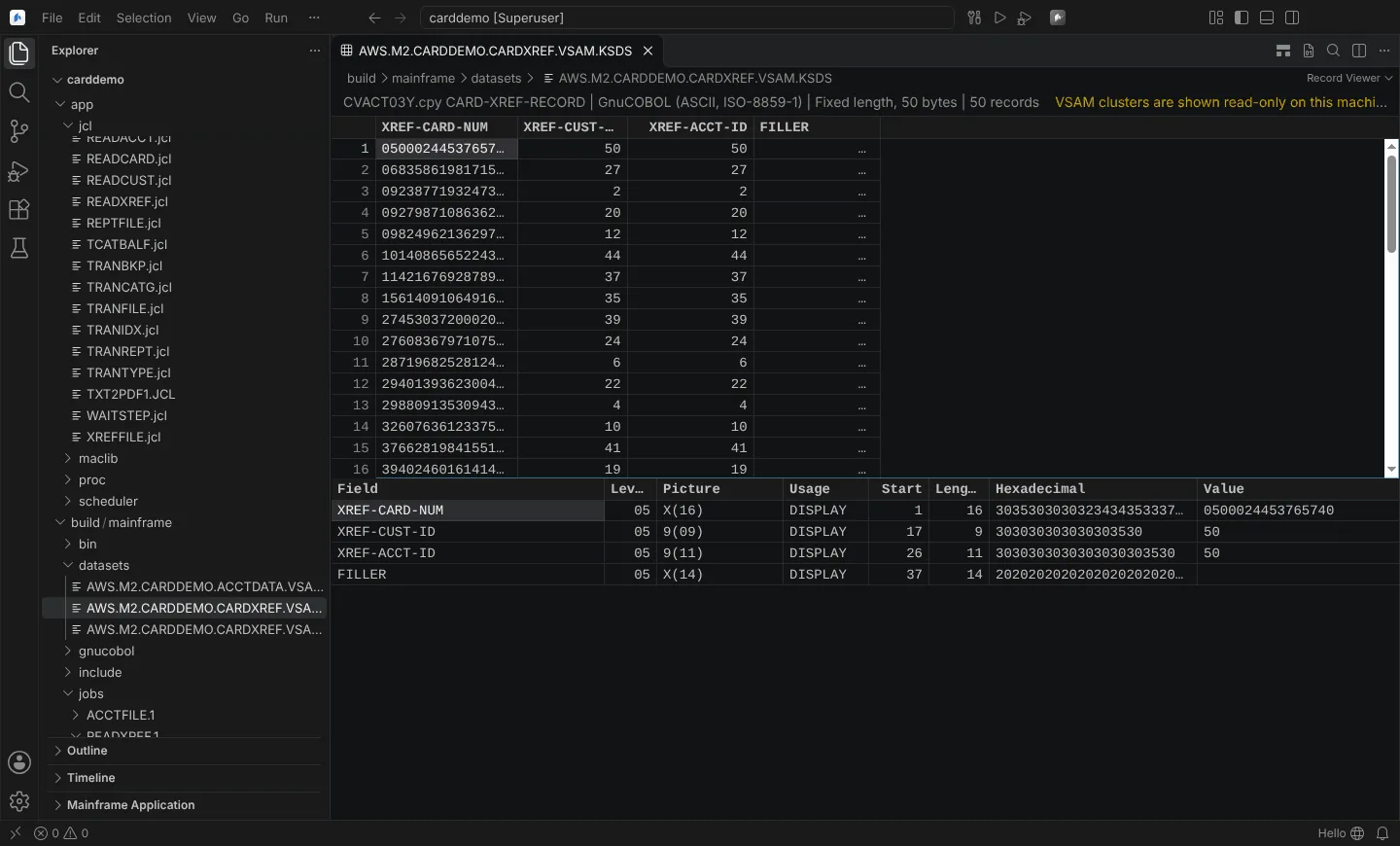 AWS CardDemo's card cross-reference file in the Record Viewer, decoded field by field through its copybook.
z/OS data sets
Records are read as z/OS stores them: binary by LRECL for RECFM F and FB, and z/OSMF record mode for V and VB, shown with their RDWs. RECFM U is refused. Text members still open as text. A save sends the same bytes back with If-Match; a 412 conflict during the save is reported. Record mode's 4-byte length prefix is taken from IBM's reference and Zowe's description, not observed on a host. A change on z/OS that keeps the size, made before the editor's own save check, is not detected.
Read the records
- Every record is a row, with a column per elementary item under its group headers.
- Invalid data is marked with the reason: data exception (S0C7), bad sign, digits beyond the PICTURE.
- True level-88 condition names are shown.
- The focused record is shown field by field.
- Toggle Hexadecimal Values shows the bytes.
- Go to Record..., Find Value in Field... and Find Next Value in Field.
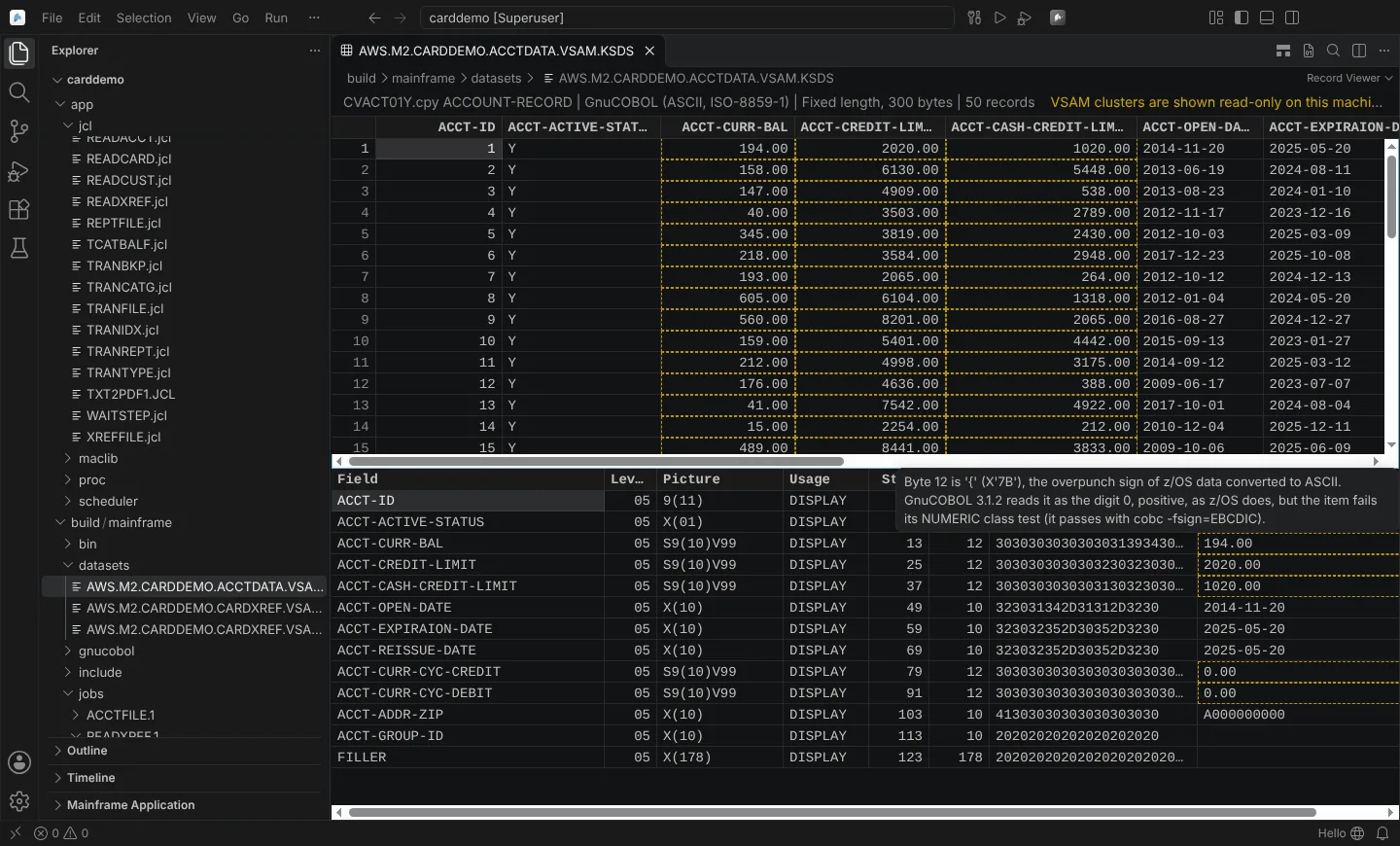 AWS CardDemo's account file through its copybook, with a warning on a signed field that keeps its z/OS overpunch sign.
Layouts it decodes
DISPLAY with every SIGN form, COMP-3, BINARY, COMP and COMP-4, COMP-5, COMP-1 and COMP-2 (IBM hexadecimal floating point on z/OS), PIC N (UTF-16 on z/OS), PIC G (hexadecimal), edited pictures, P scaling, OCCURS, OCCURS DEPENDING ON per record, REDEFINES, RENAMES, FILLER and level 88. SYNCHRONIZED is laid out as GnuCOBOL lays it out; Enterprise COBOL's slack bytes are refused rather than guessed.
Edit values
Edit a cell in place. The value is checked against the PICTURE, encoded exactly, and saved with Undo, Redo, Revert and hot exit. A data set matching neuralInverse.mainframe.readOnlyDatasets opens read-only.
Add and remove records
As in IBM File Manager:
| Command | Key |
|---|---|
| Insert Record | Ctrl+Enter |
| Duplicate Record | Shift+Alt+Down |
| Repeat Record... | Ctrl+Shift+Alt+Down |
| Delete Records | Delete (a range with Shift); Cmd+Backspace on macOS |
New records are initialised as File Manager does: spaces, and zero in zoned, packed, binary and floating point items for the code page, with the minimum OCCURS DEPENDING ON count. Each is one undo step. A save keeps the record length, RDW or GnuCOBOL length prefixes and line ends. Changing a DEPENDING ON count in a variable-length or line sequential file is refused.
Verified with GnuCOBOL 3.1.2 on Linux: fixed, variable (OCCURS DEPENDING ON) and line sequential files edited and read back by a COBOL program, every zoned and packed item passing its NUMERIC test. z/OS RDW framing is checked by unit tests only.
Accessibility
Accessibility Help (Alt+F1) in the Record Viewer names its keys, and the reason of an invalid value is the cell's accessible description. Not yet checked with a screen reader.
Templates, selection criteria, record compare, copy with reformatting, printing and test data are on File Manager functions.