The vendor's own engine runs every vendor step, in batch mode. The Editor writes the Tcl, runs the tool, and reads its messages and reports into the same Problems, report, timing, I/O and debug views as the open flow. The engineer works in the Editor; the vendor tool stays installed and licensed as before.
Verification state: read this first
No Vivado, Quartus, Libero SoC or Radiant path has been run against the vendor tool yet, and nothing has run on Windows. Each path is in one of these states:
- Kit shipped: the generated Tcl is tested line by line, its control flow runs under
tclsh8.6 with stand-ins for the vendor's commands, and a verification kit runs the exact same scripts on a real installation. Waiting for a report. - Modelled: tested against generated material, documentation or published samples only, and not in a kit yet.
- Verified (Linux), our own code: our readers and writers of the vendor's files, on real public project files. This proves the file handling, not the tool run.
Where a Tcl command's exact form could not be read in the vendor's documentation, the pages say it comes from search results; the kit checks it.
What each vendor path covers
Of the windows, views, menus and dialogs engineers use in the four vendor IDEs, 168 are listed in Neural Inverse's inventory: 159 are covered natively or by driving the vendor's engine, and 9 still need the vendor IDE (see What's next).
AMD Vivado (and Vitis HLS)
| Area | Page |
|---|---|
| New project from parts and boards | New project |
Import an .xpr; Project Sources, Libraries, Compile Order; project settings; Write Project Tcl; Archive | Open and edit vendor projects |
| Linter, RTL and I/O ports DRC | Timing analysis and constraints |
XSim, Questa, Riviera-PRO, Xcelium, VCS; compile_simlib; .wcfg layouts | Simulate and test, Waveforms |
| Build, flow steps, messages, DRC and methodology waivers, utilisation, power, incremental and out-of-context runs, strategies | Build with Vivado, Quartus, Libero and Radiant |
| Design session: report_timing, timing summary, clock interaction, Tcl console, netlist; Timing Constraints Wizard; Edit Timing Constraints; Report CDC; QoR | Timing analysis and constraints |
| I/O planning, Report Noise | I/O planning |
| Device view, Pblocks | Device view and floorplanning |
| IP Catalog, Customize IP, Create and Package IP, Vitis HLS | IP, packaging and HLS |
| IP Integrator block designs | Block designs and SoC systems |
| Program, configuration memory, Export Hardware for Vitis, tandem | Program the board |
| ILA, VIO, trigger state machines, JTAG-to-AXI, System Monitor, IBERT | Hardware debug |
| ECO, Dynamic Function Exchange | ECO and partial reconfiguration |
| Keymap and Language Templates | Edit HDL and constraints |
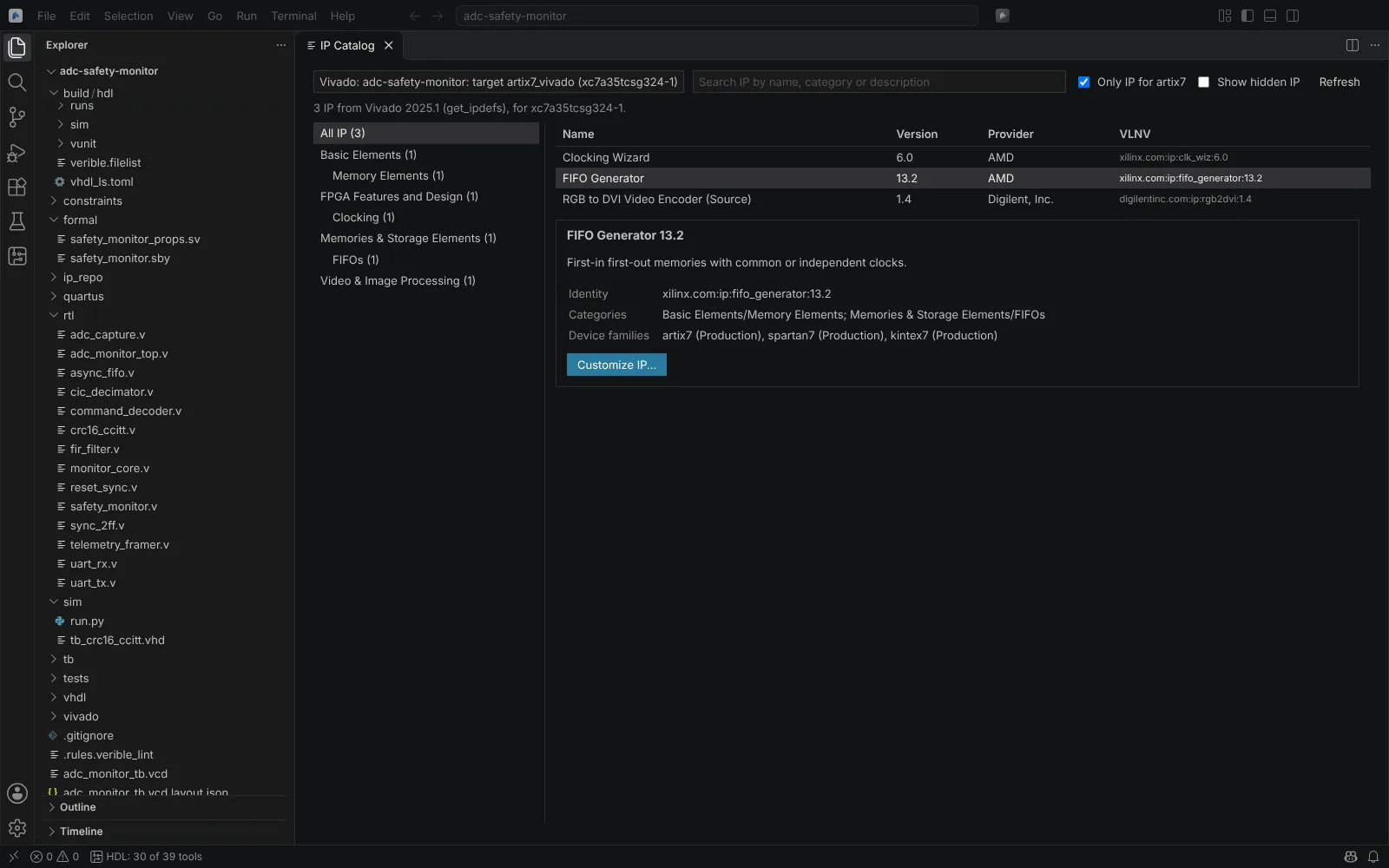 The IP Catalog for an Artix-7 target, filtered to the part's family
Altera Quartus Prime (Pro, Standard and Lite)
| Area | Page |
|---|---|
| New project from parts | New project |
Import a .qpf or .qsf; files and global assignments; Assignment Editor; Design Partitions | Open and edit vendor projects |
| Questa-Intel FPGA Edition | Simulate and test |
| Build and compilation stages, Power Analyzer, Design Assistant, partitions, Rapid Recompile | Build with Vivado, Quartus, Libero and Radiant |
| Timing Analyzer session, CDC Viewer, Tcl console, technology map | Timing analysis and constraints |
| Pin planning, periphery plan | I/O planning |
| Placement, Logic Lock regions | Device view and floorplanning |
| IP Catalog, IP Parameter Editor | IP, packaging and HLS |
| Platform Designer, Nios V software | Block designs and SoC systems |
| Programmer, Convert Programming Files | Program the board |
| Signal Tap, In-System Sources and Probes, In-System Memory Content Editor, System Console and Transceiver Toolkit | Hardware debug |
| Pro partial reconfiguration | ECO and partial reconfiguration |
Microchip Libero SoC
| Area | Page |
|---|---|
Import and edit a .prjx | Open and edit vendor projects |
| QuestaSim with Microchip libraries | Simulate and test |
| Design Flow steps, SmartPower | Build with Vivado, Quartus, Libero and Radiant |
| SmartTime, Constraint Manager | Timing analysis and constraints |
| PolarFire I/O and attributes | I/O planning |
| Placement and regions | Device view and floorplanning |
| Catalog cores | IP, packaging and HLS |
| SmartDesign, design initialisation | Block designs and SoC systems |
| Synplify Pro technology view and FSM encodings | Hierarchy, schematics and state machines |
| FlashPro Express, STAPL | Program the board |
| SmartDebug, SerDes lanes | Hardware debug |
Libero documents no part list in batch mode, so Libero parts are not in the New Project wizard.
Lattice Radiant
| Area | Page |
|---|---|
Import and edit .rdf and .sty | Open and edit vendor projects |
| Questa with Radiant libraries | Simulate and test |
| Builds with LSE or Synplify Pro, strategies and seeds | Build with Vivado, Quartus, Libero and Radiant |
| Timing paths, Analyze More Paths, Timing Constraint Editor | Timing analysis and constraints |
| Pins and I/O attributes from the pad report | I/O planning |
| Netlist Analyzer | Hierarchy, schematics and state machines |
IP Catalog with ipgen | IP, packaging and HLS |
pgrcmd, chain scan and .xcf | Program the board |
| Reveal Inserter and Analyzer files | Hardware debug |
Radiant documents no part list, so Radiant parts are not in the New Project wizard.
Verification kits
The kits run the Editor's exact generated scripts on your installation, without the Editor, and collect what happened. Each kit has its own README with exact steps. On Windows, for example:
cd verification\vivado
Set-ExecutionPolicy -Scope Process -ExecutionPolicy Bypass
.\run-verification.ps1| Vendor | Scripts | Needs a board |
|---|---|---|
| Vivado | run-verification.ps1 (catalogue, example projects, builds, IP, block designs, project editing, flow steps, messages, DRC, simulation, incremental runs), run-design-session.ps1, run-ip-customization.ps1, run-block-design.ps1, run-ip-packaging.ps1, run-hls.ps1, run-device-view.ps1, run-eco.ps1, run-dfx.ps1 | No |
| Vivado | run-hardware-debug.ps1, run-lab-debug.ps1, run-configuration-memory.ps1 | SP701 or AC701 |
| Vivado | run-serial-io.ps1 | AC701 |
| Quartus | run-verification.ps1, run-design-session.ps1, run-ip-customization.ps1, run-analysis.ps1 (Nios V with -NiosV), run-platform-designer.ps1, run-partial-reconfiguration.ps1 (Pro), run-interface-plan.ps1 | No |
| Quartus | run-signaltap.ps1, run-insystem.ps1, run-transceiver.ps1 | An Intel board (with transceivers for the last) |
| Libero | run-verification.ps1 (programming and a read-only SmartDebug pass with -Program), run-smartdesign.ps1 | PolarFire kit for programming |
| Radiant | run-verification.ps1 (programming with -Xcf) | Lattice board for programming |
What you need:
| Vendor | Licence for the free route | Hardware steps need |
|---|---|---|
| AMD Vivado | Vivado ML Standard (free) covers Artix-7, Spartan-7 and small Zynq parts | An SP701 or AC701 board and its JTAG cable |
| Altera Quartus Prime | Lite (free) or Pro | A MAX 10, Cyclone or Agilex 3 board |
| Microchip Libero SoC | A free Silver licence | A PolarFire evaluation kit and FlashPro |
| Lattice Radiant | A free licence | A CertusPro-NX or CrossLink-NX board |
Each script ends with the path of a results-<date>-<time>.zip. Send it back with anything the script printed as failed. The archives contain logs, reports and the generated scripts, never your licence files or bitstreams (only their sizes and SHA-256). Record the operating system, each tool's edition and version, the board and its revision, and the date. A capability becomes verified only from such a report.
The Vivado kit has been sent to a tester with Vivado on Windows; no results have come back yet.