State: modelled: panels run on the Editor's virtual bus with the rest-bus simulation, on python-can's udp_multicast bus, and against Vector's XCPlite for calibration controls. Not run on hardware or against a production ECU.
A panel is a file
Run New Panel.... A panel is a *.panel.json file of the module's own format, version 1, kept in your workspace and version control: a name, a grid (columns, cellWidth and cellHeight; 12 columns of 96 by 56 pixels by default) and controls, each with its type, cell (x, y), size (w, h) and optional label. The file has a JSON schema, so editing it as text (Reopen Editor With, or Show Panel Source Text) gives completion and checks. The Panel editor lists what it cannot read with its line and runs the rest; a file of another format version is refused.
Controls
| Control | Does |
|---|---|
display | A signal's physical value with its unit, or its value name |
gauge, bar | A round gauge or a bar, scaled by min and max, else the database's limits, else the range of the signal's bits |
lamp | Lit by a value or value name (on), else any non-zero value, in one of five theme colours |
switch | Toggles a signal between on and off (by default its two value names, else 1 and 0) |
slider, input | A physical value within the signal's limits; an input of a signal with value names is a list. Values the limits or bits cannot hold are refused before anything is sent |
button | Sets a signal while pressed and on release; or runs a neuralInverse.automotive.* command (such as starting a recording); or runs a CANoe test unit or one test case of it |
characteristic | A VALUE characteristic of a connected ECU or open ECU image, written only by Write (or Enter) and read back |
measurement | A scalar measurement of a connected ECU; Measure starts it if it is not measured |
label | Text or a heading |
A signal is named by source, message, signal and optionally channel. With "source": "simulation" the control shows and sets what the rest-bus simulation sends; with "source": "bus" it shows the latest decoded value, and a write sends the message once through Interactive Transmit with E2E and SecOC protection where the message has them. Without a channel, the control binds to the one open channel or running simulation whose databases hold the message. A calibration control names the object and optionally its a2l file. A control that cannot bind says why on the control.
Run it live
A panel opens running. Values refresh ten times a second while it shows. On the virtual bus the controls act at once. On a real bus (any channel not on the Editor's virtual bus, the vendors' virtual channels and python-can's interfaces included) every action of every control asks first, naming the change, the channel and its interface: a slider step, a switch, a button press and its release are each confirmed. A panel file cannot act on a vehicle network unseen, whoever wrote it.
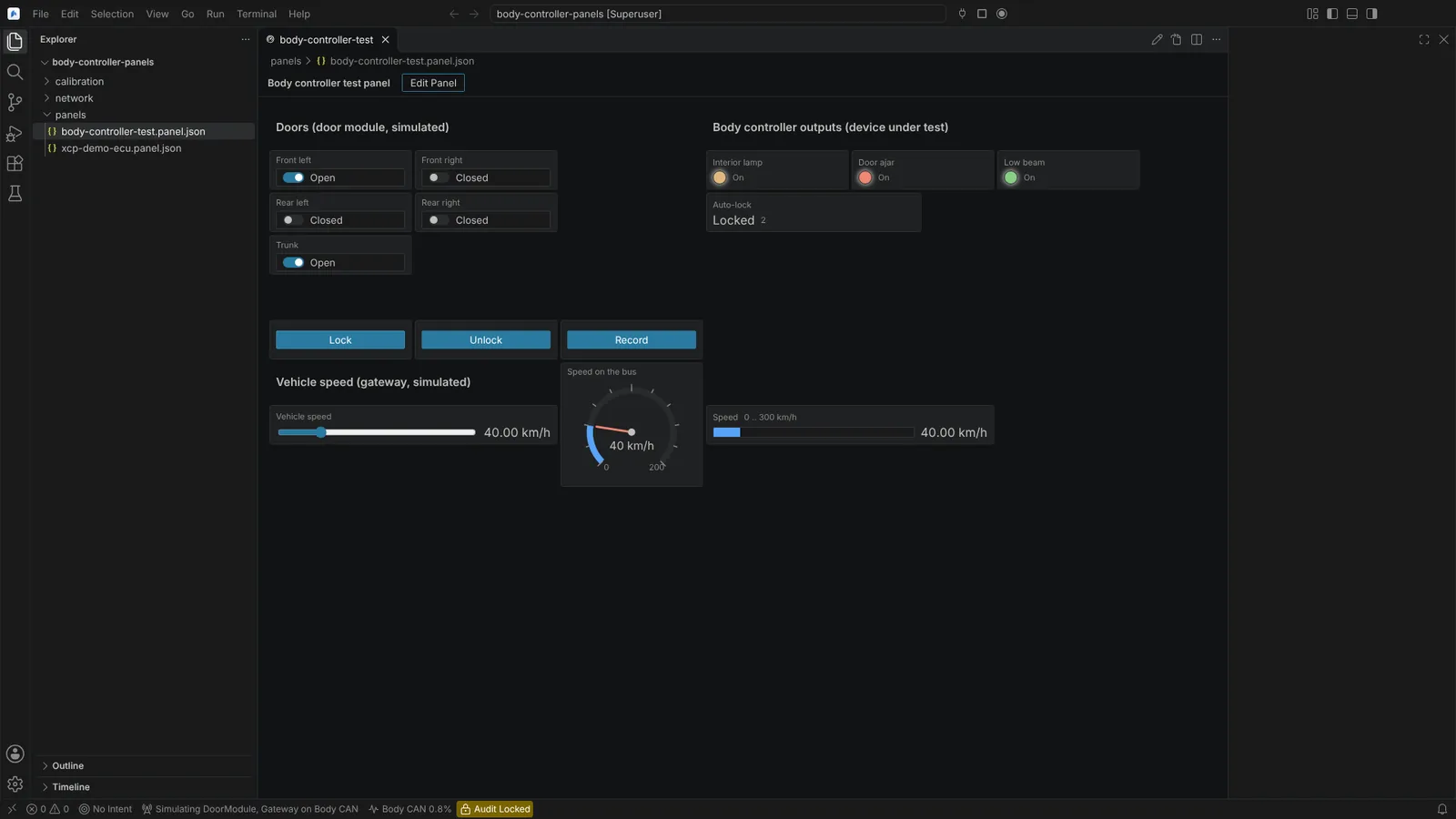 A body controller test panel live on the bus: doors and trunk switches, a speed slider, lock buttons, lamps, a gauge and a bar.
Edit it
Edit Panel shows the grid; Finish Editing Panel ends it.
- Arrow keys move the selected control by a cell, Shift with the arrows sizes it, Delete removes it, Enter or F2 (or a double click) changes its properties. Dragging moves a control and its corner handle sizes it.
- Add Control to Panel... asks for the type and then what it binds to, picked from lists: signals of the open channels, running simulations and workspace databases, value names, automotive commands, CANoe test units, and characteristics and measurements of connected ECUs and open images. No name has to be typed.
- Each gesture is one edit of the file that changes only what it sets, with comments and formatting kept; one Undo takes it back, in the panel or in the text.
Each control is a focus stop with its name, type, cell and size for screen readers; switches, buttons, sliders, gauges and lamps carry their roles, states and values.
Not verified: schema completion in the text editor was not seen in the running Editor; the confirmations ran on python-can's bus, not on a Vector, PEAK or Kvaser channel.