State: XCP and A2L are verified against Vector's XCPlite (MIT, built from source) as the ECU, and A2L reading against a2lfile on vendor sample files. Recording to MDF 4 is verified against XCPlite, the files read value for value by asammdf and mdflib. MDF analysis is verified on files written by other tools (ASAM's ASAP2 demo recording, Kvaser and CSS Electronics files). The parameter sweep is verified against XCPlite on Linux. No production ECU, and no XCP on CAN ECU, has been used. Neither CANape nor INCA has opened a file written here. Work on a bench ECU only.
A2L files
A2L files open as their own language: modules, measurements, characteristics (values, curves, maps, value blocks, ASCII), axis points, conversion methods and tables, record layouts, memory segments, groups, functions, units, the XCP section of IF_DATA and /include, with checks, outline, hovers, go to definition, references and rename. Check A2L Files in Workspace checks every file. Keeping the A2L in step with the ECU build is on Calibration data and the A2L update.
Connect and measure
- Run Connect to ECU for Calibration (XCP) and pick the ECU's A2L. XCP runs over Ethernet (UDP and TCP) and over CAN and CAN FD through the module's channels; the XCP master handles identification, upload and download, calibration pages, DAQ lists with timestamps, named error codes, timeouts and retries.
- Run Open Measurement Window and add measurements. Live values show with units, polled or by DAQ lists, in the signal plot.
- Open the A2L Stored in the ECU uploads and opens the ECU's own A2L, where it holds one.
- Show Calibration Session Log shows the session's log. Disconnect ECU Calibration (XCP) ends it.
Calibrate
Calibrate Characteristic... opens a calibration window. Edit values, curves, maps, value blocks, ASCII strings and axis points in physical units through the A2L's conversion methods; Write to ECU writes them and reads each value back; Read from ECU and Discard Changes are beside it. Switch Calibration Page... switches calibration pages.
A map is also drawn as a 3D surface and a curve as a line beside the table (Hide 3D View, Show 3D View); the table stays the editor:
- axes carry their points at their physical values, with the input quantity and unit from the A2L;
- the cell focused in the table is ringed on the surface, and a point clicked on the surface focuses its cell;
- values typed and not yet written move the surface at once and are marked;
- drag or the arrow keys turn and tilt, the wheel or + and - zoom, Home resets; the toolbar's Turn Left, Turn Right, Tilt Up, Tilt Down, Zoom In and Zoom Out do the same from the keyboard;
- for a screen reader the view is described by its axes, value range and the selected cell.
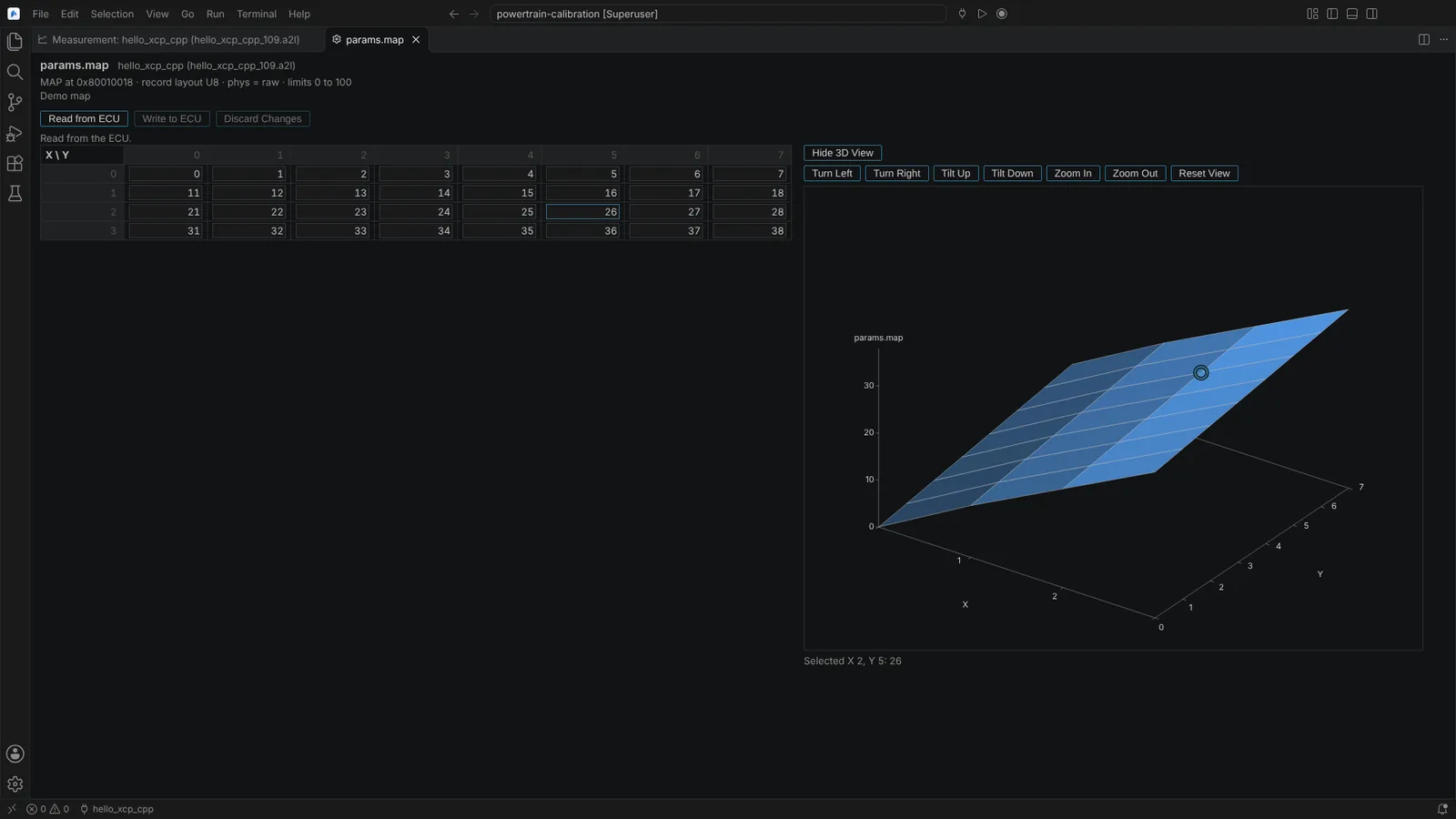 A calibration window for a map, with the table as the editor and the 3D surface beside it.
Every write to an ECU's memory and every page switch asks first, naming the ECU, its A2L, the transport and each value before and after; a page switch names each memory segment and the page before and after.
Record a measurement to MDF 4
Record Measurement to MDF... (or Record... in the measurement window) records the signals being measured to an .mf4 file you name:
- an optional start condition on the measured signals, in physical values or their texts (
counter > 600,speed > 3000 and gear == "Drive",abs(x) < 2), checked as you type, with a pre-trigger time of up to 600 s; - an optional stop condition with a post-trigger time, otherwise until Stop Measurement Recording;
- one channel group per raster, values stored as the ECU sent them with the A2L's conversion as an MDF conversion, and units, limits and descriptions.
The status bar and the measurement window show the phase (waiting for the start trigger, recording, post-trigger, writing); the measured signals are locked while it runs. A notification opens the file when it is written. MDF 4 is read and written by the module itself, without Python.
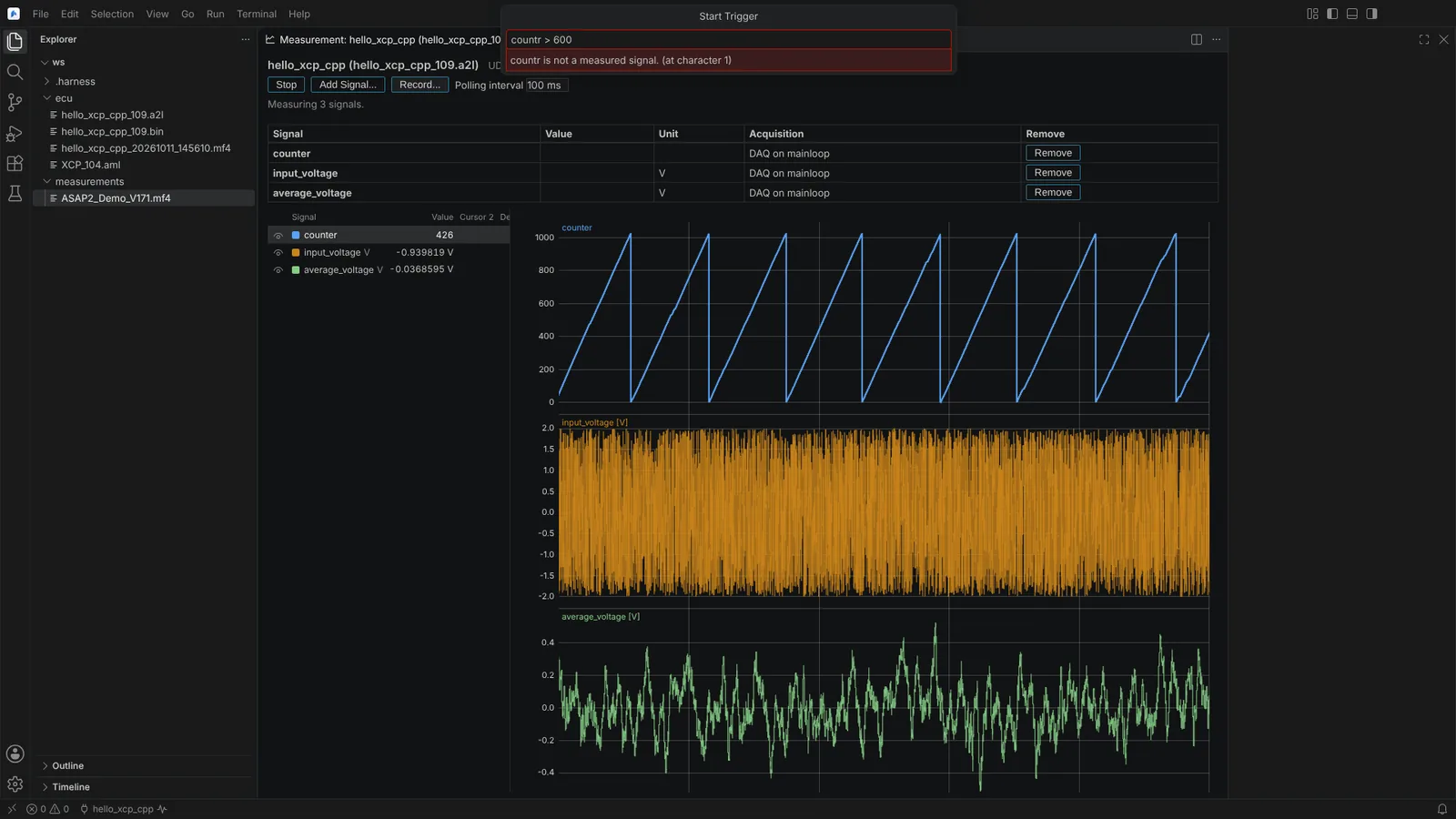 The start condition of a recording checked as it is typed, naming a signal that is not measured.
Analyse a measurement file
MDF 4 files of measurements open in the measurement file editor (Open as Measurement File): the file's tool, start time and comment; each channel group with its samples and source; each channel to plot or not; the signal plot with two cursors; and statistics (samples, minimum, maximum, mean, standard deviation, with units) between the cursors or over the time shown. Sorted and unsorted, compressed, listed and unfinalised files are read, with channel conversions 0 to 8. A file of bus logging opens in the CAN Trace editor instead.
Sweep a parameter
In the calibration window of a connected ECU, Sweep... opens the sweep below the table for the value focused there (a scalar, one cell of a curve, map or value block, or one axis point):
- Give the values (from, to and step, or a list, at most 1000), the dwell time, an optional settle condition on the measurements with its timeout, the measurements, and whether to record to MDF.
- Start Sweep... checks every value against the limits and data type, then asks once for the whole sweep: the ECU, its A2L and transport, the characteristic, every value in order, the times, the measurements, the recording, and that the original value is written back at the end.
- Each value is written and read back, the sweep waits for the settle condition, holds the value for the dwell time, and summarises each measurement (count, mean, minimum, maximum, last) per value in a table and plot. Cancel Sweep stops after the current wait.
- At the end, on cancel or on a failed write, the original value is written back exactly as stored, and the status says so.
With Record to MDF, the recording has a channel group "Parameter sweep" with the value read back and the step number (sweep_step), plotted beside the response in the measurement file editor. One sweep runs per ECU.
From an agent
23 calibration agent tools cover the same actions: list targets, connect and disconnect, list objects, measure, read and write characteristics, sweep, list and switch pages, data sets, compare and merge, images, recording and reading measurement files. Each write, page switch, data set download and sweep asks every time; on an ECU image the tools ask nothing, as the image changes only when saved. See Approvals and audit.
Not verified: a production ECU's A2L (the vendor A2L files are demo size), XCP on CAN against an ECU, the 3D view on maps of hundreds of points by side, Windows. MDF readers of other tools give the nearest table entry where the A2L's default value applies, so a recorded value outside a table can read differently there. If the Editor ends during a recording, the samples stay in its cache folder and no file is written.