The Embedded Linux module is for engineers who build embedded Linux products on Wind River Linux, the silicon vendors' Yocto BSPs (NXP i.MX, TI, AMD, ST), the Yocto Project and kas, with Buildroot as a second path. The engineer works on a company laptop, often Windows, against the team's Linux build server: the module reaches that server through the operating system's OpenSSH client and opens the existing build directory on it as the project. Boards are reached over SSH in the same way.
State: early development, not ready for use
The module is a base platform behind the setting neuralInverse.embeddedLinux.enabled, which is off by default and works only in a trusted workspace. Much is built behind it, and every page of this section says what each part has been run against. Read this before trying it:
- Modelled on Linux only. Every capability has run on Linux against OpenSSH 9.6p1 (client and server on the same machine), stand-in build hosts and stand-in boards (BusyBox and Dropbear in QEMU arm64, chroots, a systemd container), and the real Yocto and Linux tools where a page says so (BitBake 2.8.1 with poky scarthgap, devtool, wic, RAUC, SWUpdate, Mender, U-Boot tools, perf, Valgrind, trace-cmd, LTTng, Cppcheck, gcov).
- Not run on Windows, which is the laptop the module is designed for.
- Not run against a real build server over a real network, or against Wind River Linux.
- No real board (such as the i.MX 8M Plus EVK) has been used, and no image built by BitBake for a real board has been opened.
- No vendor tool run: no
petalinux-*command has run, and STM32CubeProgrammer has never written a board. - Known issues include very slow device tree opening over a remote build host (512 to 570 seconds, against 79 ms on a local disk) and a copy to a Dropbear board that ended with EPIPE.
Do not use it for production work. It is documented so hardware teams can test it and send results back (Reference and testing).
Turn it on
Run Neural Inverse: Enable Embedded Linux Environment from the command palette, or set neuralInverse.embeddedLinux.enabled to true in the workspace settings, then trust the workspace. Disable Embedded Linux Environment turns it off again. While the setting is off, no SSH session, view, status entry, file system, BitBake navigation, build history or agent tool exists; the BitBake language (colouring) is always registered and runs nothing.
The module's commands are in the command palette under Neural Inverse Embedded Linux. Its views are in the Embedded Linux side bar: Build Directory, Variable History, Targets and AMD PetaLinux. Its log is the Embedded Linux output channel, which records sessions, commands and project reads, never credentials.
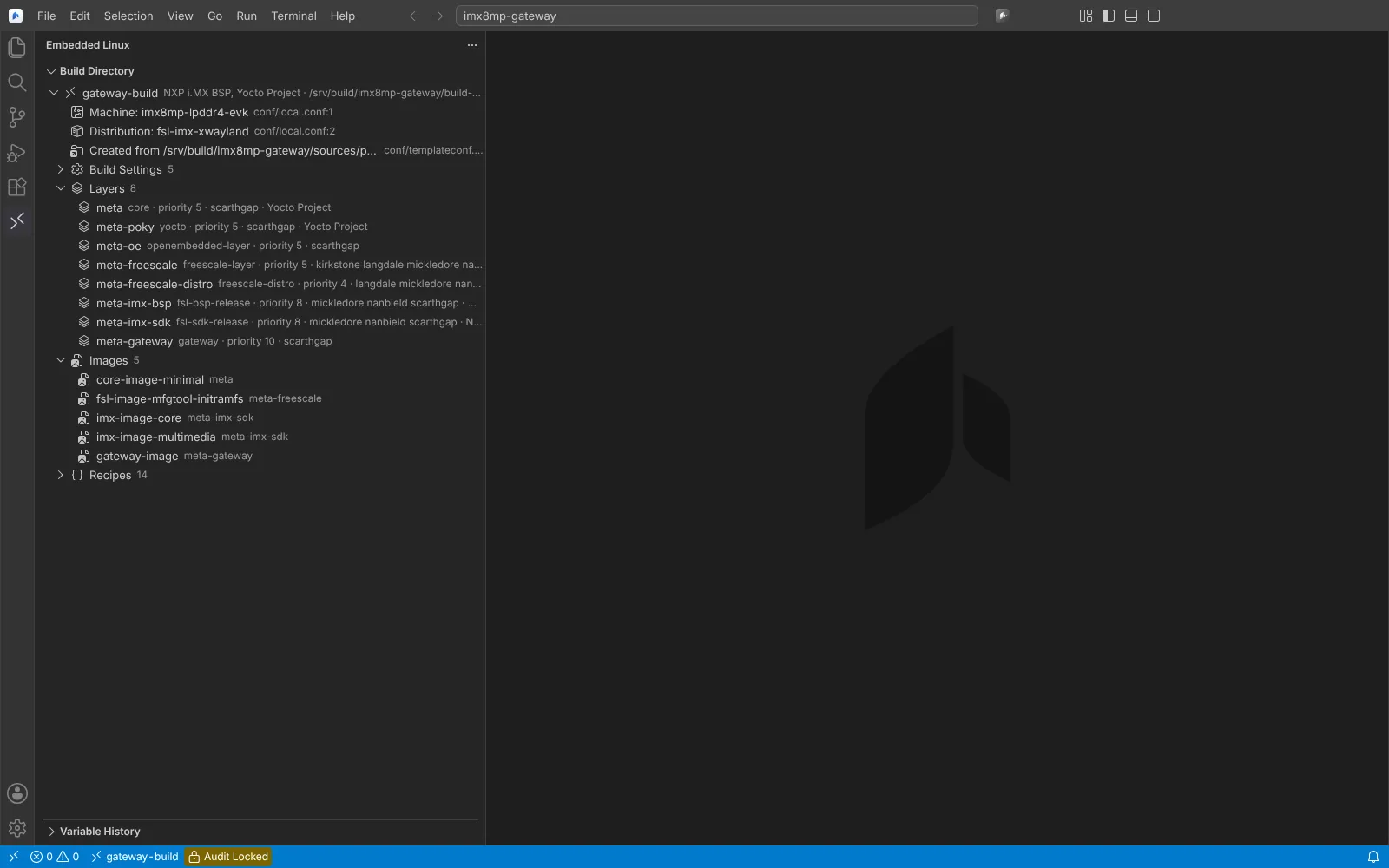 The Embedded Linux side bar with the Build Directory view: machine, distribution, layers with priorities and release series, and images of an NXP i.MX build directory.
What is built, by task
| Task | Page | State |
|---|---|---|
| Reach the build server over SSH, trust its key, run commands, edit its files | Set up the build host | Modelled on Linux (localhost sshd) |
| Open the build directory: machine, distribution, layers, images, recipes, kas, Buildroot; manage layers | The build directory and layers | Modelled with real BitBake 2.8.1 |
Read and change local.conf, machines, distributions and configuration fragments | Build configuration | Modelled with BitBake 2.8.1 and 2.18.0 |
Edit recipes, follow require and inherit, see why a variable has its value | BitBake recipes and Variable History | Modelled with BitBake 2.8.1 |
| Build an image, a recipe or a task with Ctrl+Shift+B, failures in Problems | Builds | Modelled; no image build |
| Compare builds from build history | Build history | Modelled on test repositories |
| devtool modify, build, finish, deploy; new recipes and upgrades | devtool | Modelled with poky scarthgap devtool |
| Applications built with the SDK, clangd with the sysroot | SDK applications | Modelled with a stand-in SDK |
| Cppcheck with MISRA, sparse, checkpatch.pl | Static analysis | Modelled with real tools |
| Boards over SSH: files, copy, terminal, reboot | Targets | Modelled with stand-in boards |
| A board's processes, services, kernel log and boot time | The board's system and boot time | Modelled on QEMU and a container |
| Debug an application on the board, attach, core dumps | Debug on the board | Modelled with x86_64 stand-ins |
| Kernel configuration and fragments; kernel oops decoding | Kernel configuration and crash reports | Modelled; kernel_configcheck never run |
| Device trees, overlays and KERNEL_DEVICETREE | Device trees | Modelled with dtc and fdtoverlay |
| Write the image to a board; partition layout with wic | Images and partition layout | Modelled; no board written |
| Start the build's image in QEMU | QEMU | Modelled with a stand-in image |
| RAUC, SWUpdate and Mender packages | Update packages | Modelled on stand-in boards |
| Package feeds and the board's package manager | Package feeds | Modelled with opkg |
| FIT signing with an HSM; dm-verity, IMA and EVM | Verified boot and file system integrity | Modelled with SoftHSM and veritysetup |
| SBOM and CVE triage | SBOM and CVEs | Modelled with real cve-check output |
| Licence review against a company policy | Licence compliance | Modelled |
| Mirrors, offline builds and fetch evidence | Sources and mirrors | Modelled with a local mirror |
| testimage, ptest and coverage on the board | Tests and coverage on the board | Modelled with stand-in boards |
| perf, Valgrind Memcheck and Massif | Profiling and memory checking | Modelled with stand-in boards |
| ftrace, trace-cmd and LTTng | Kernel and system traces | Modelled on QEMU arm64 |
| PetaLinux projects and the AMD Yocto flow | AMD PetaLinux | Checked against AMD's project files; no PetaLinux command run |
Settings, confirmations and the hardware team's test steps are in Reference and testing. What is not built yet is listed in What's next.
How it relates to the Embedded module
Embedded Linux is its own module. It shares the Embedded module's process host, environment gate and log channel, the clangd client, the GDB/MI debug session and Cppcheck's check groups. Cortex-M firmware on the same SoC (for example the i.MX 8M Plus Cortex-M7) is built and debugged by the Embedded module.
The serial console for U-Boot and kernel logs is the Embedded module's Open Serial Monitor: typing at the U-Boot prompt, the kernel log and the login prompt go through it. It has run only between two virtual serial ports on Linux, never on a real board's console.
Agents use the same services: listing and reading are read-only agent tools, and every command, build, devtool action, board write, signing and update is a tool that always asks the person first.
Next: Set up the build host.