State: reading ECUC values and parameter definitions is verified on public files (AUTOSAR's R4.4.0 standardized module definitions, Vector's published DaVinci output, two community files) against autosar-data, every definition and value compared. The checks are verified on configurations written by autosar-data and on AUTOSAR's show case. DaVinci projects (.dpa, .dvjson) are read and verified on Vector's public projects. Validation, generation and update with DaVinci Configurator Classic's dvcfg-b are kit shipped: not yet run against DaVinci Configurator, modelled against a stand-in. ISOLAR-B's ECUC files open directly. No customer project.
Read the configuration
From AUTOSAR 4 ARXML files the module reads:
- the parameter definitions of each BSW module: containers, choice containers, sub-containers, parameters of every kind (boolean, integer, float, enumeration, string, function name, linker symbol and the others) with multiplicity, range, default, lengths and regular expression, and references of every kind with their destinations;
- the configuration values: containers and sub-containers, parameter values and reference values, each with the definition it names. Numbers are read as the schema writes them, integers exactly past 64 bits.
See it checked
Problems (source "ECU Configuration") reports, at the element that causes each: a value outside its definition's range, not a number or boolean, not one of the enumeration's literals, too long or too short; a container, parameter or reference configured too few or too many times; a choice container holding none or several choices; a value naming a definition its module does not have; the wrong value element; a reference to nothing or to the wrong kind of container. Where a module's definition is not in the workspace (a vendor's definitions ship with the BSW package), the module is reported once with the files to add, and its values are checked for form only. Formulas and system constants are said to be unchecked.
Configure in the BSW Configuration editor
Run Open BSW Configuration (Command Palette, the gear in an ARXML file's editor title, or Reopen Editor With).
- The modules and containers as a tree, filtered by name or definition, each with the worst problem it holds.
- The selected module or container as a form generated from its definition: path, definition, multiplicity and description; a row for each parameter, configured or not, with an input of its type that refuses a value out of range, of the wrong form or too long, with the reason; references picked from valid targets, with a link to the target; sub-containers added under a name you give and removed; the SHORT-NAME renamed in place.
- Each edit is minimal: only the value's text, or one element with its lines, placed where the AUTOSAR schema orders it, indented as its neighbours. A container rename updates the references to it in the same file. The text editor and this editor share one undo history.
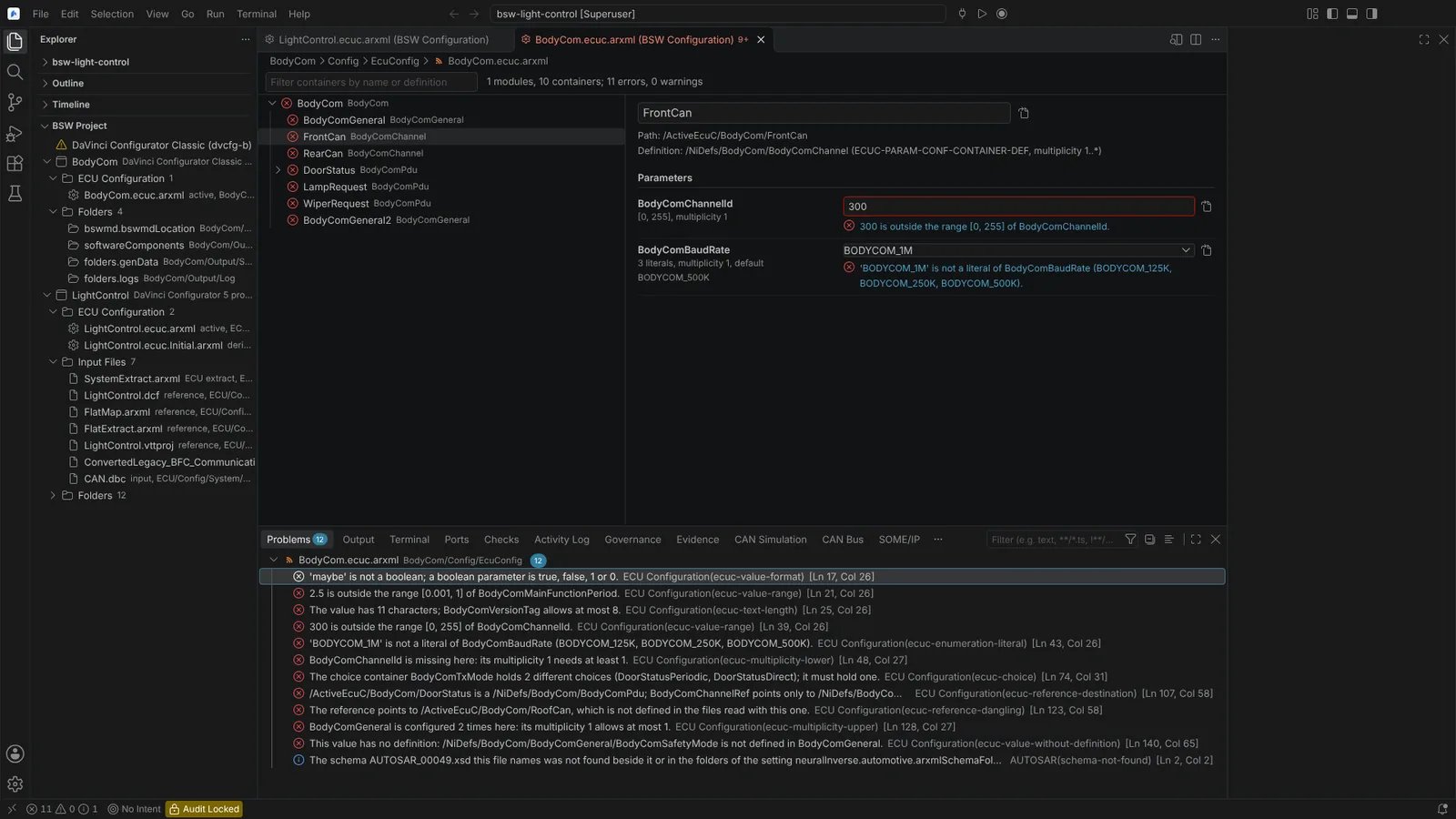 A BSW configuration checked against its module definitions: each fault on the tree, at its row and in Problems.
Open the DaVinci project
The BSW Project view in the Explorer lists each DaVinci project of the workspace: DaVinci Configurator 5 projects (.dpa) and DaVinci Configurator Classic 6 projects (.dvjson and its settings files), with their ECUC files, inputs, folders and BSW package. Each ECUC file opens in the BSW Configuration editor. A file the project names that does not exist on this machine is a warning in Problems. Nothing in a project file is written.
Validate, generate and update with DaVinci
Set neuralInverse.automotive.davinciCliPath to dvcfg-b (or leave it empty to look on PATH) and neuralInverse.automotive.bswPackagePath to the BSW package, unless the project names its own.
| Command | Runs |
|---|---|
| Validate DaVinci Project | dvcfg-b project validate with an HTML report in build/davinci/validation_report.html |
| Generate BSW and RTE | dvcfg-b project generate |
| Update DaVinci Project from New Extract... | dvcfg-b project derive-ecuc with the extract you pick, then dvcfg-b project update; or "Update from the Project's Input Files" alone |
For the update you pick its parts, all by default: correct references (-a), solve all (-s), the input files' changes (-c), the RTE configuration (-r), the evaluated variant set (-e). The command lines are those of Vector's published automation rules. Runs are cancellable; the tool's output goes to the Automotive output, a failed run (exit code, last lines, the report) to Problems on the project file, and the view lists the report and every file the run wrote or changed. Each run records the tool, its version and arguments in build/davinci. A .dpa is not run, because dvcfg-b takes Classic 6 projects.
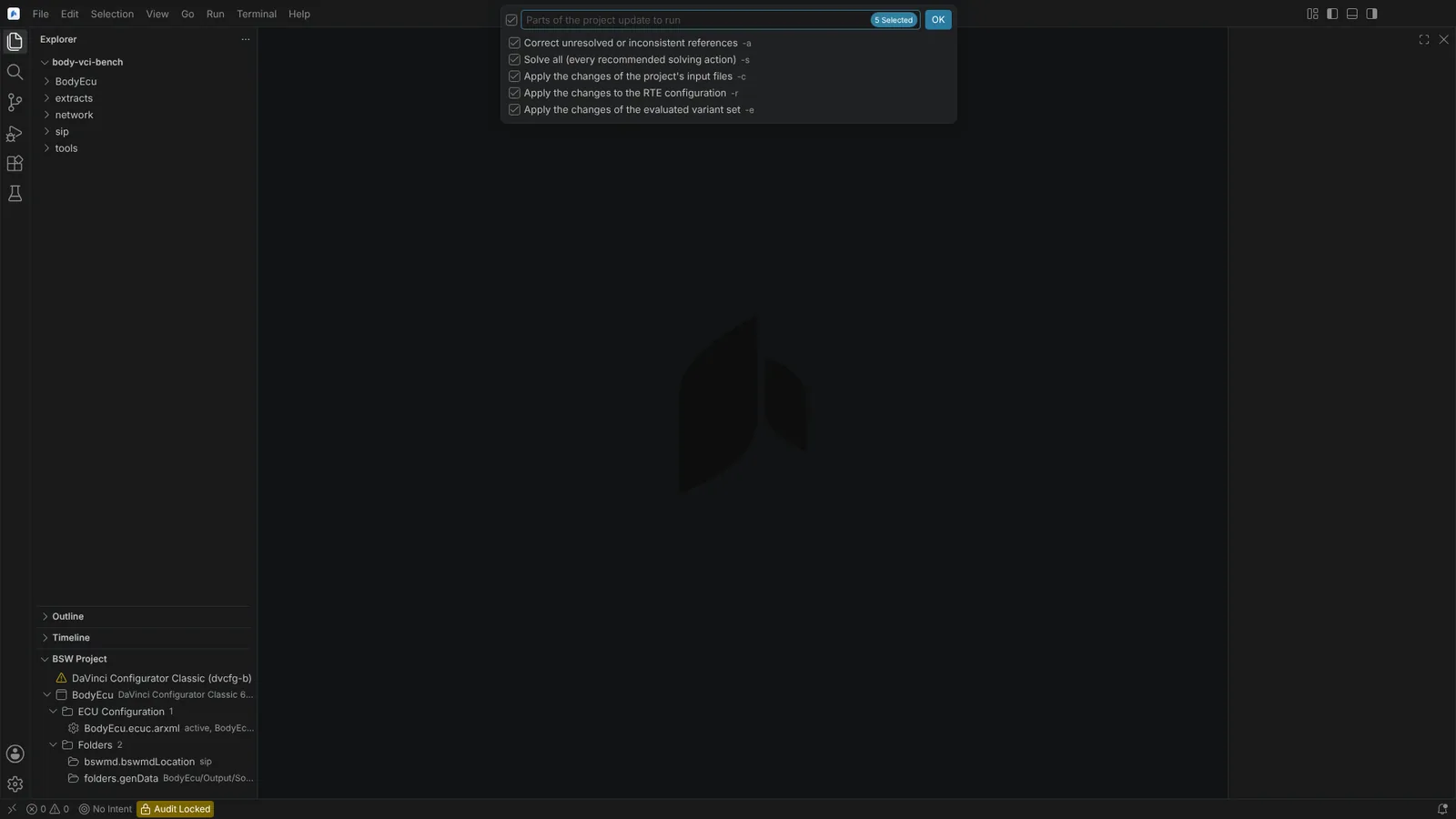 Update DaVinci Project from New Extract: the five parts of the update, each with its dvcfg-b switch.
Not verified: what dvcfg-b prints and its HTML report's structure have not been seen, so findings are one problem on the project file rather than at their element. No MICROSAR, EB tresos or RTA-BSW module definitions were available, so checks ran against AUTOSAR's standardized definitions only. The workspace's ARXML search reads up to 200 files within a few folder levels for this editor, so a large BSW package's definitions may not all be found. Values are read as written.