State: modelled: every message of COVESA's dlt-daemon test files and of logs COVESA's DLT library wrote through dlt-daemon reads as DLT Viewer 2.25.0 and dlt-convert 2.18.10 read them, column by column; DLT in captures reads as tshark's DLT dissector reads it. No log of a vehicle ECU, an Adaptive platform's log daemon or a vendor logger was tried.
Open a log
.dltfiles open in the DLT Log editor (Open as DLT Log in the Explorer). A damaged stretch is skipped to the next storage header and reported with its byte offset.- In a capture, the Ethernet Trace editor's DLT tab reads DLT over TCP and UDP on the ports in
neuralInverse.automotive.dlt.ports(default dlt-daemon's 3490 and 3491). Each message is timed by the packet that completed it; DLT frames have their own column in the Link Load tab.
What is decoded
- Headers: version, counter, length, ECU ID, session ID, timestamp, and the extended header's message type, log level, argument count, application and context ID.
- Verbose payloads: every argument type (booleans, integers of 8 to 128 bits with names, units and fixed point, floats, strings, raw data, trace info, arrays and structs) in the byte order the header gives.
- Non-verbose payloads: the message ID, and the data decoded where a description describes the ID: FIBEX files as the DLT specification lays them out, and the workspace's ARXML (DLT-MESSAGE with its DLT-ARGUMENTs). Add files with Add Description..., which writes
neuralInverse.automotive.dlt.descriptionFiles. Without a description, a message shows as its ID and bytes. - Control messages: the service ID named, a response's status.
Work with the log
- One row per message: number, reception time (local, or UTC with
neuralInverse.automotive.dlt.utcTime), ECU timestamp, counter, ECU, application, context, session, type and level, mode, argument count and payload. Fatal and error in the error colour, warnings in the warning colour, debug and verbose dimmed. - Filter by ECU, application and context (pick from the IDs in the log, with counts), by highest log level, and by text.
- Expand a row for its headers, the description that decoded it, every argument with its name, unit and type, and the payload bytes.
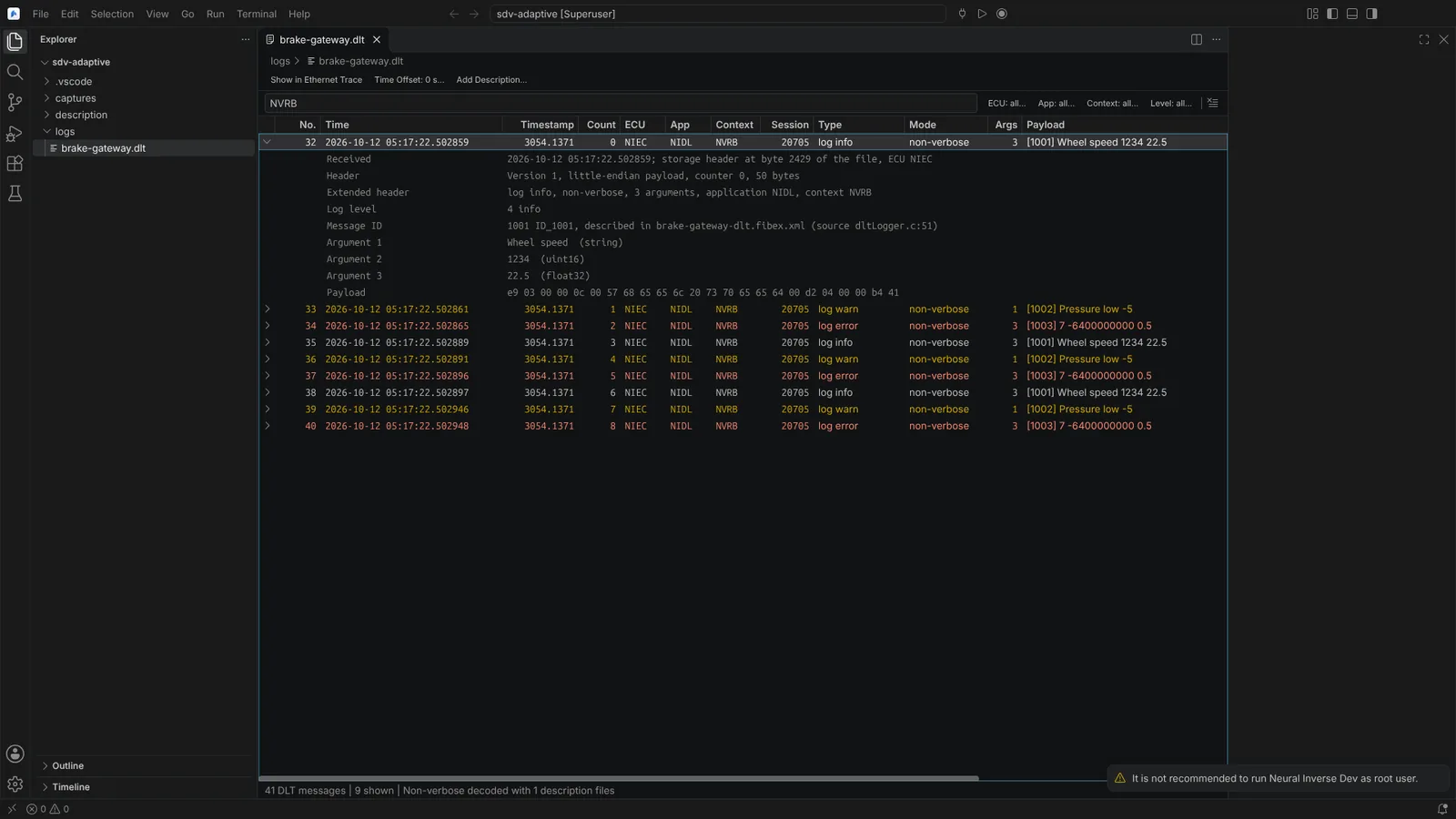 A DLT log filtered to a non-verbose context, with a message expanded and decoded by its FIBEX description.
Line up with the Ethernet trace
A DLT file's reception times and a capture's packet times are both wall-clock times, so they line up when the same computer recorded both.
- Show in Ethernet Trace (DLT Log toolbar) takes the focused message's time to the Ethernet trace open beside it.
- Show in DLT Log (Ethernet Trace toolbar) does the reverse from a SOME/IP, DoIP or DLT message.
- Time Offset (DLT Log toolbar) adds seconds to the log's times when it was recorded on another clock.
DLT's own timestamps (time since the ECU started) are shown, not used for the alignment.