Production programming with J-Flash
The line's SEGGER J-Flash project (.jflash) opens in the Editor as a read-only view, and runs from it.
The project view
Open a .jflash file. The view shows the J-Flash version that saved it and the file's SHA-256, then:
- Target: device, core id, interface, speed before and after the init steps, probe, RAM for the flash loader, data file;
- Production steps (what
-autodoes): erase, program, verify, secure, start application, each marked "changes the device" or "cannot be undone" where it does; - Serial number: address, length, next serial and increment;
- Flash banks, with option bytes and fuses marked "cannot be undone when programmed";
- the init steps run on connect, and the project's other keys as stored.
Run a batch
- Click Run Production... in the view, or run Run J-Flash Production....
- Give the data file and the number of units in this batch.
- Read the confirmation. It names the device, the project and the data file with their SHA-256, the serial range (for example 10001 to 10010), every change to the device, and the steps that cannot be undone, such as read-out protection.
- Confirm. For each unit, J-Flash runs on a copy of the project with that unit's serial number:
-jflashlog -openprj -open -auto -exit.
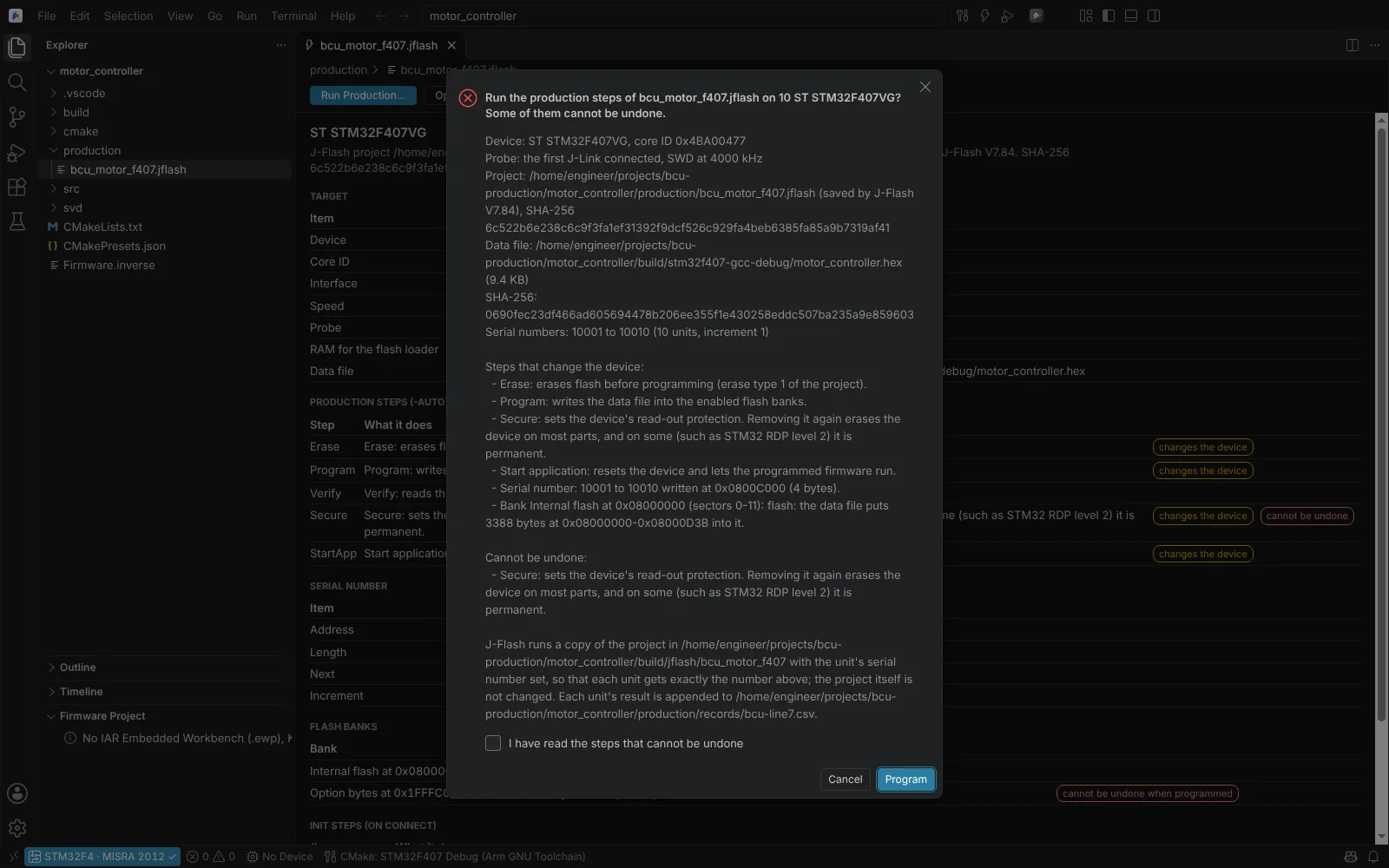 The confirmation of a J-Flash production run: device, project and data file with their SHA-256, the serial range, every change and the steps that cannot be undone.
Each unit appends a line to the CSV production record: time, project and data file with their SHA-256, device, serial number, result and log. The file is neuralInverse.embedded.jflash.productionRecord, relative to the first workspace folder; Open J-Flash Production Record (or the view's button) opens it.
State: the project reader tested on 8 public projects saved by J-Flash V4.78 to V7.84; the service with a stand-in J-Flash; the kit's per-unit project copy equal to the Editor's in bash and PowerShell 7.4.6; used in the app on Linux. Kit shipped (jlink). Not yet run against J-Flash, a J-Link or a board; J-Flash's exit codes, log wording and the meaning of some project keys are unverified.
Agents can list and read J-Flash projects and preview a production run; a run itself (Run J-Flash Production) waits for the same confirmation.
Compare a device with the release file
For a returned unit, or before a release: is the device's flash the release image, and if not, what differs?
- Start a debug session on the unit (or in the emulator).
- Run Compare Device Memory with Release File..., or right-click an image in the Explorer and choose Compare with Device Memory.
- Choose the ELF, Intel HEX or BIN file. The module reads the same ranges from the device through the session's probe.
- The result lists the differences by address and by section of the image, and you can save a Markdown report with the file's SHA-256 for the release record.
It never writes to the device.
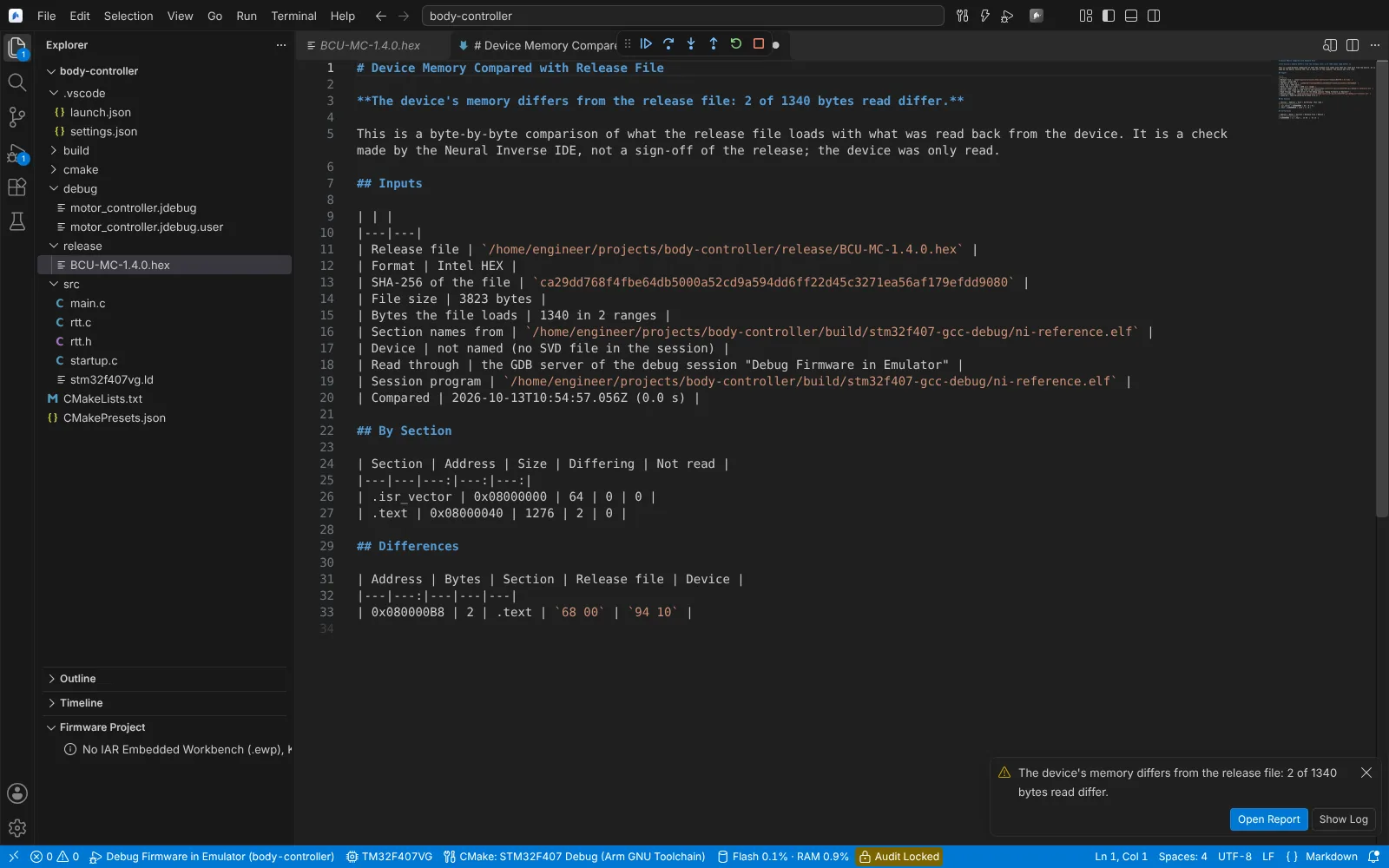 The Markdown report of a device memory comparison with an Intel HEX release file, listing the differing bytes by address and section.
State: verified against QEMU's netduinoplus2 machine with gdb-multiarch 15.1 on Linux: ELF, HEX and BIN files match, and a changed byte is found in .text and checked with objdump; run in the app against QEMU. Not run on a real board through a probe. Agents can run the comparison (Compare Device Memory with Release File), read-only.