Open Timing Analysis opens one Timing Analysis editor per target, for every family. For the open flow it reads nextpnr's reports and the RTL, verified on Linux. For vendor targets it drives the vendor's own timing engine, kit shipped or modelled: not yet run against Vivado, Quartus, Libero or Radiant. Nothing is verified on Windows.
Open-flow targets
From the last build
- each clock with its target, the frequency it reaches and its worst slack;
- a clock interaction matrix of launching against capturing clocks, inputs and outputs, each cell with the worst path between them (timed within a clock; not timed between clocks or at the I/O);
- the worst paths, step by step (clock to output, logic, routing with its budget, setup) with arrival times and the design signal each step goes through, linked to the source, from the launching register to the capturing one.
Selecting a cell of the matrix narrows the paths and crossings to that pair of clocks. Show Synthesized Schematic from a path highlights its cells; see Hierarchy, schematics and state machines.
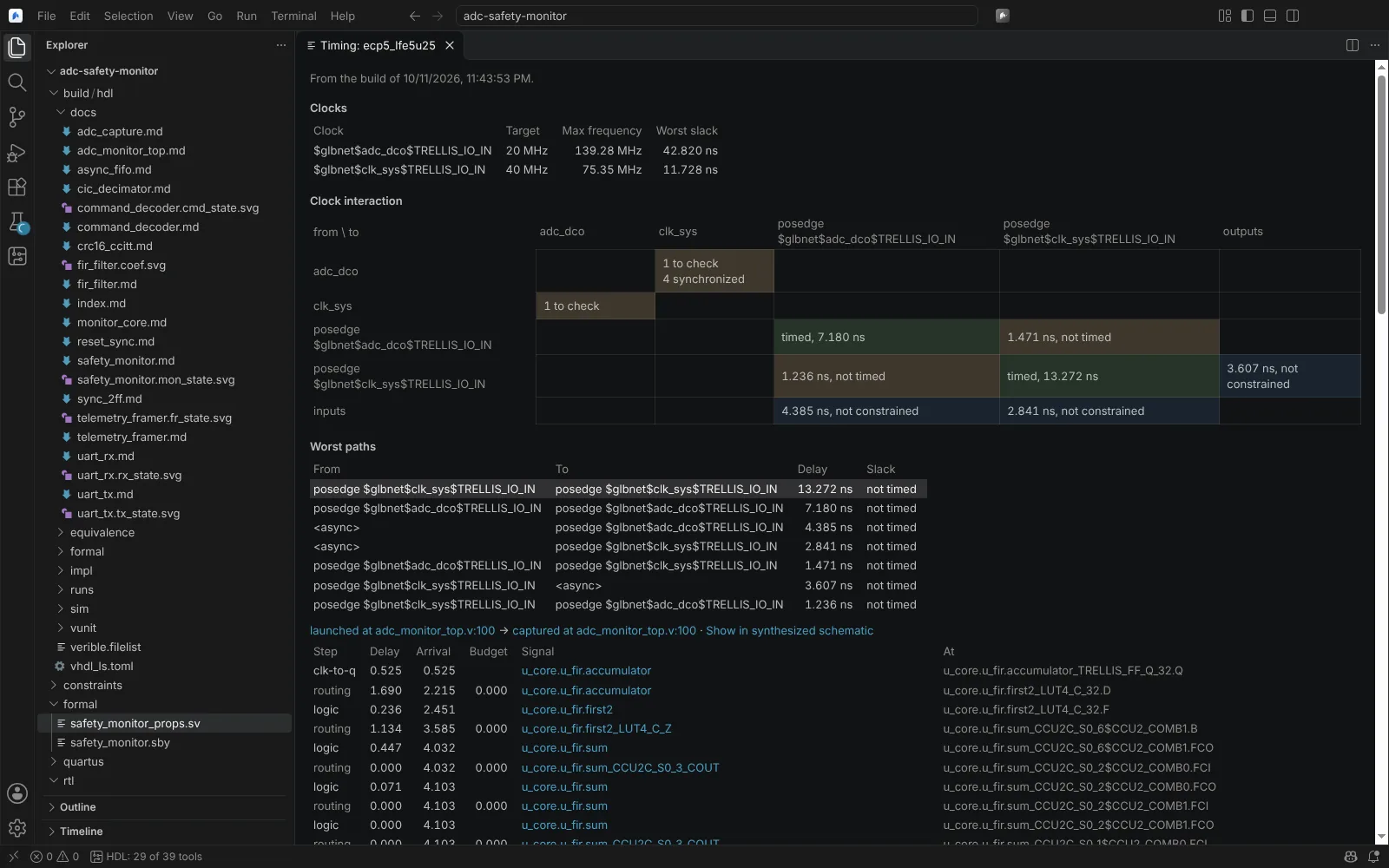 The Timing Analysis editor with each clock's target and maximum frequency, the clock interaction matrix and the worst paths
State: verified (Linux) with nextpnr's reports. Figures are nextpnr estimates, not sign-off timing. The open flow has no hold slack.
Clock domain crossings from the RTL
Before any build, and again after each save, every clock domain crossing is found in the netlist Yosys flattens, with what makes it unsafe:
- logic between the domains (a glitch can be captured);
- a single capturing register whose output reaches logic (metastability spreads);
- a bus synchronised bit by bit (bits captured from different cycles).
Each is told apart from a two-register synchroniser and from a memory written in one domain and read in the other (the FIFO pattern).
State: verified (Linux) with Yosys. Known limit: Gray-coded FIFO pointers (the Cummings asynchronous FIFO) are still reported as bus crossings. On Vivado targets, Vivado's own Report CDC (below) classifies them correctly.
Vivado design session
For a Vivado target, Open Timing Analysis opens a build checkpoint (post_synth.dcp, post_place.dcp or post_route.dcp) in a persistent Vivado Tcl session beside the Editor:
report_timingfrom, through and to cells, pins, ports, nets or clocks; setup, hold or both;-max_paths,-nworstand-group. Each path shows every cell and net, increment and arrival, clock skew terms, uncertainty and each cell's source line. Paths to an endpoint or from a startpoint are one click away.- the timing summary (WNS, TNS, WHS, THS, pulse width) and Vivado's clock interaction table;
- Find for cells, nets, pins, ports and clocks, with their properties.
Open Vivado Tcl Console opens a terminal bound to the same session: history, multi-line commands, streamed output and Ctrl+C. The prompt names the open checkpoint and marks a changed design. Commands that change the design are marked, and nothing is written into the project. Show Vivado Netlist draws a level of the netlist, cross-probed from a timing path to its cells and source lines.
State: kit shipped; parsers tested on Vivado 2025.1 output, the whole flow on a stand-in of a two-clock design.
Timing Constraints Wizard
In the design session, Run Timing Constraints Wizard asks the open checkpoint what is missing (check_timing, clocks, port fan-in and fan-out, clock interaction) and proposes primary and generated clocks, input and output delays, and asynchronous clock groups. Validate reads the proposals into the design with read_xdc, in memory only. Write Selected writes them into the XDC after you confirm the exact lines.
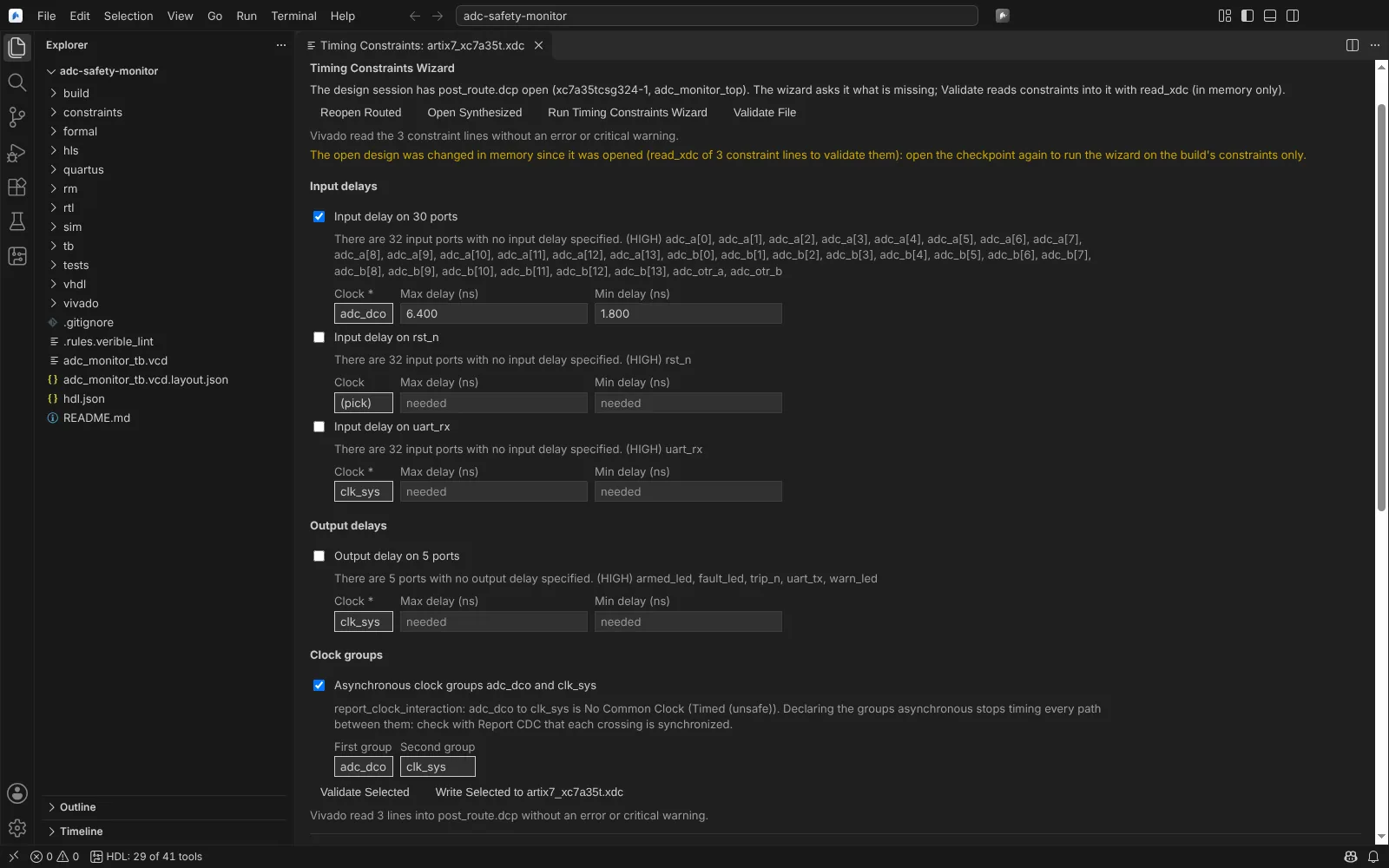 The Timing Constraints Wizard proposing input delays and asynchronous clock groups from the open checkpoint
Report CDC
Report CDC runs report_cdc -details on the open checkpoint, after creating the CDC waivers kept in hdl.json. Crossings are graded by severity, cross-probed to paths and the schematic, and shown above the RTL crossings view. Waive adds a waiver with a reason to hdl.json, created with create_waiver -type CDC.
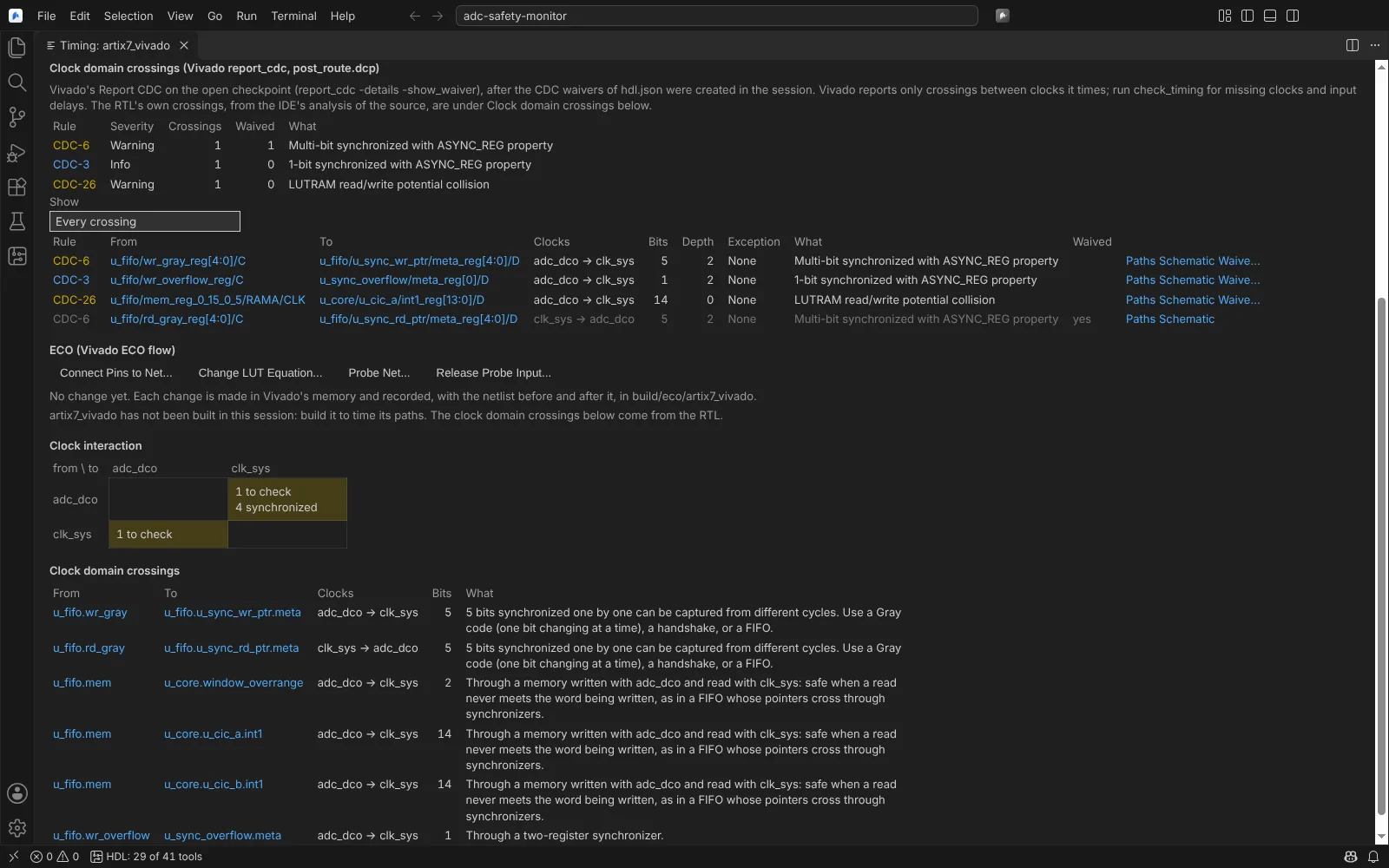 Vivado's Report CDC above the RTL crossings view, with a waived Gray-pointer crossing
QoR assessment and suggestions
QoR Assessment shows report_qor_assessment and report_qor_suggestions. Applying them writes the .rqs next to hdl.json, which the flow reads before synthesis, or applies an ML strategy; both only after you confirm.
Vivado linter and RTL DRC
Run Vivado Linter (synth_design -lint) and Run Vivado RTL and I/O Ports DRC (report_drc on the elaborated design) put their results in Problems.
State of this section: kit shipped; parsers tested on real CDC, QoR, lint and DRC reports of public projects. The kit's batch checks need Vivado 2023.2 or later.
Quartus timing session
For a Quartus target, Open Timing Analysis drives one quartus_sta -s Tcl shell on the compiled project (fitted or synthesised snapshot):
report_timingfrom, through and to keepers, registers, ports, pins, nets, cells or clocks, for setup, hold, recovery, removal or every corner, each path in full and checked againstget_timing_paths;- clock transfers, and Fmax and slack at every operating condition;
- Report Unconstrained Paths; constraints
read_sdcignored go to Problems at their SDC line; - the CDC Viewer (
report_cdc_viewer) for setup and hold, and the metastability report with synchroniser MTBF.
Open Quartus Tcl Console runs Tcl in that session; commands that change the timing netlist or its constraints are marked, and the project's SDC files are not written.
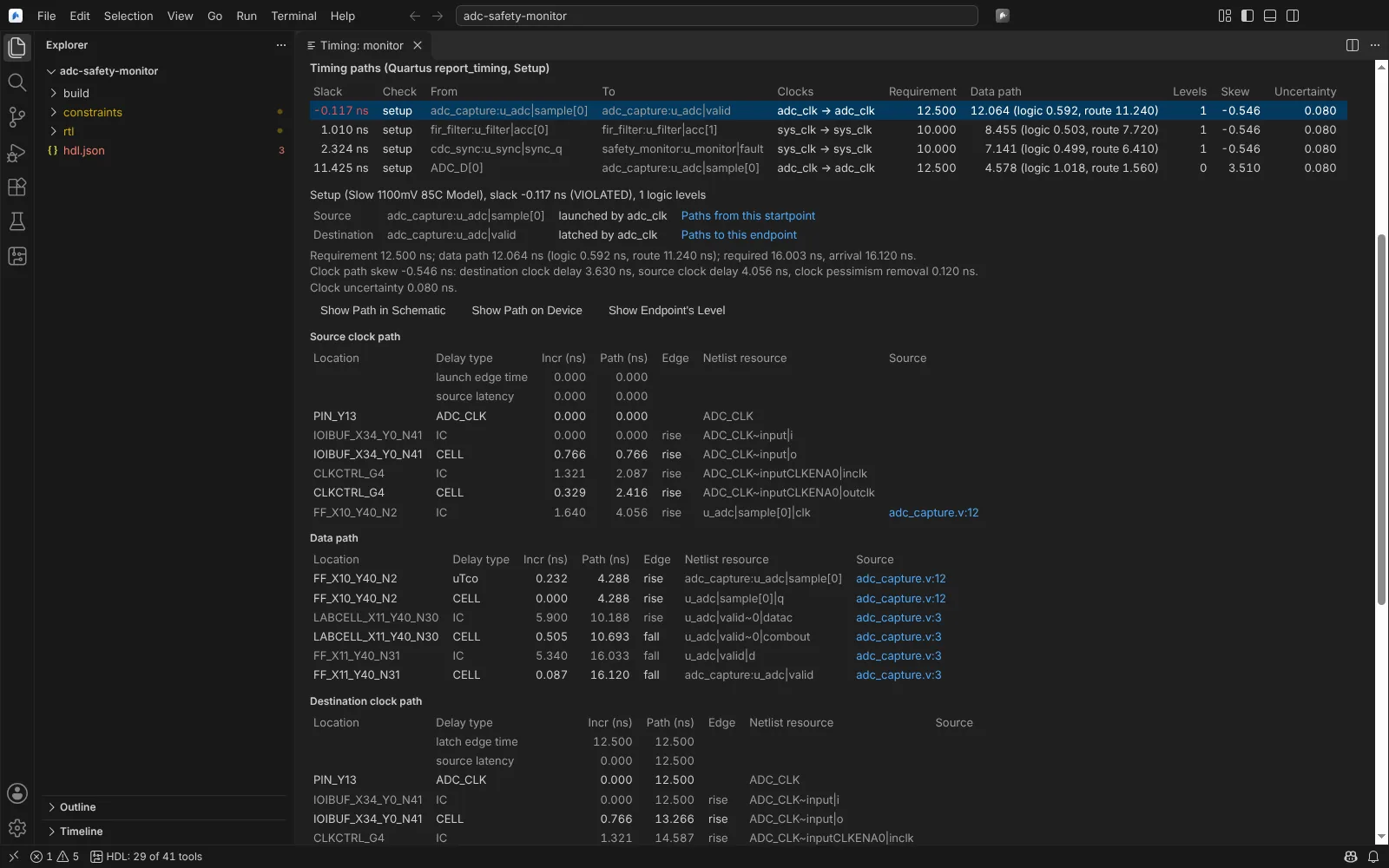 A Quartus setup path in the Timing Analysis editor, each step linked to its source line
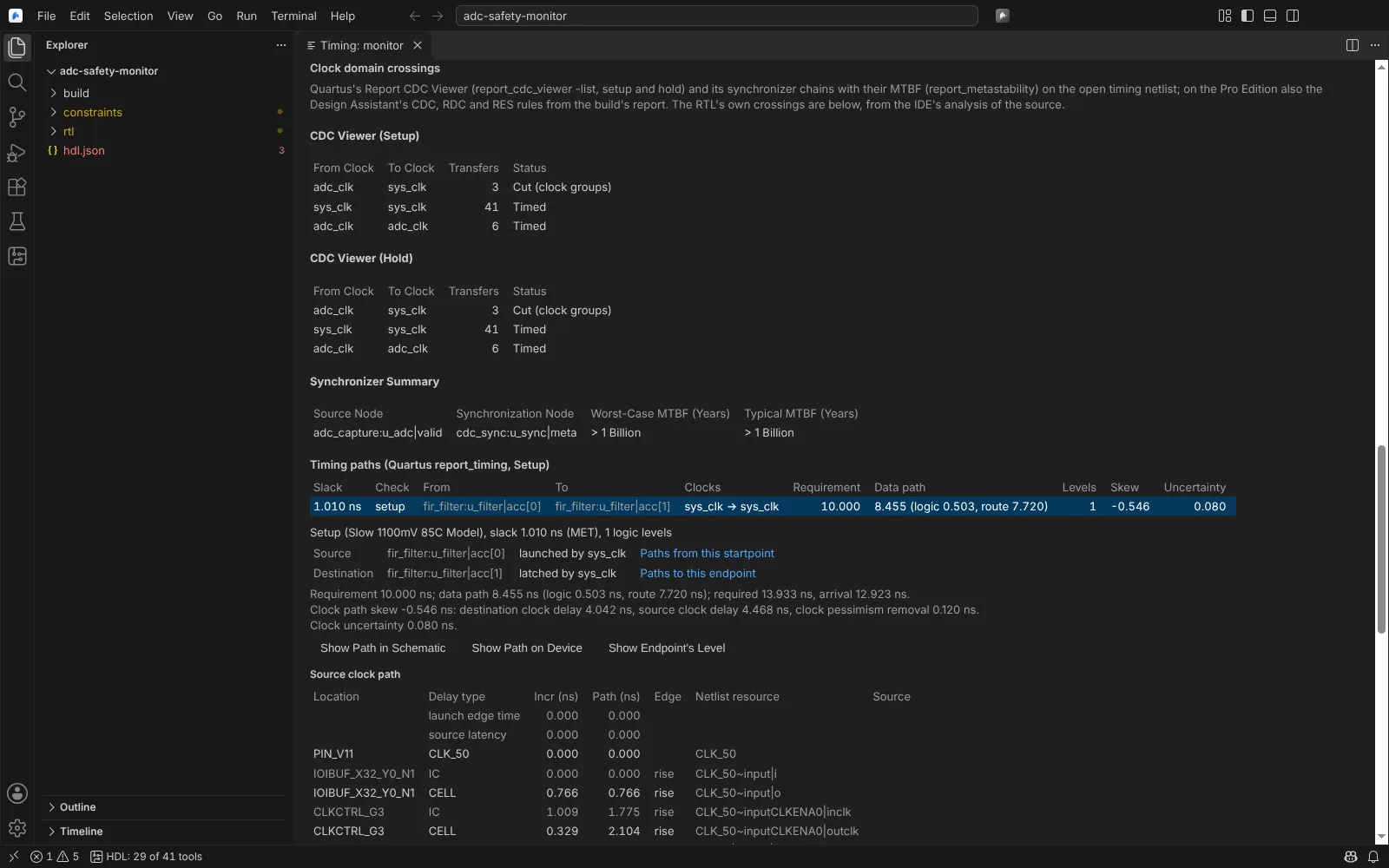 Quartus's CDC Viewer and synchroniser MTBF in the Timing Analysis editor
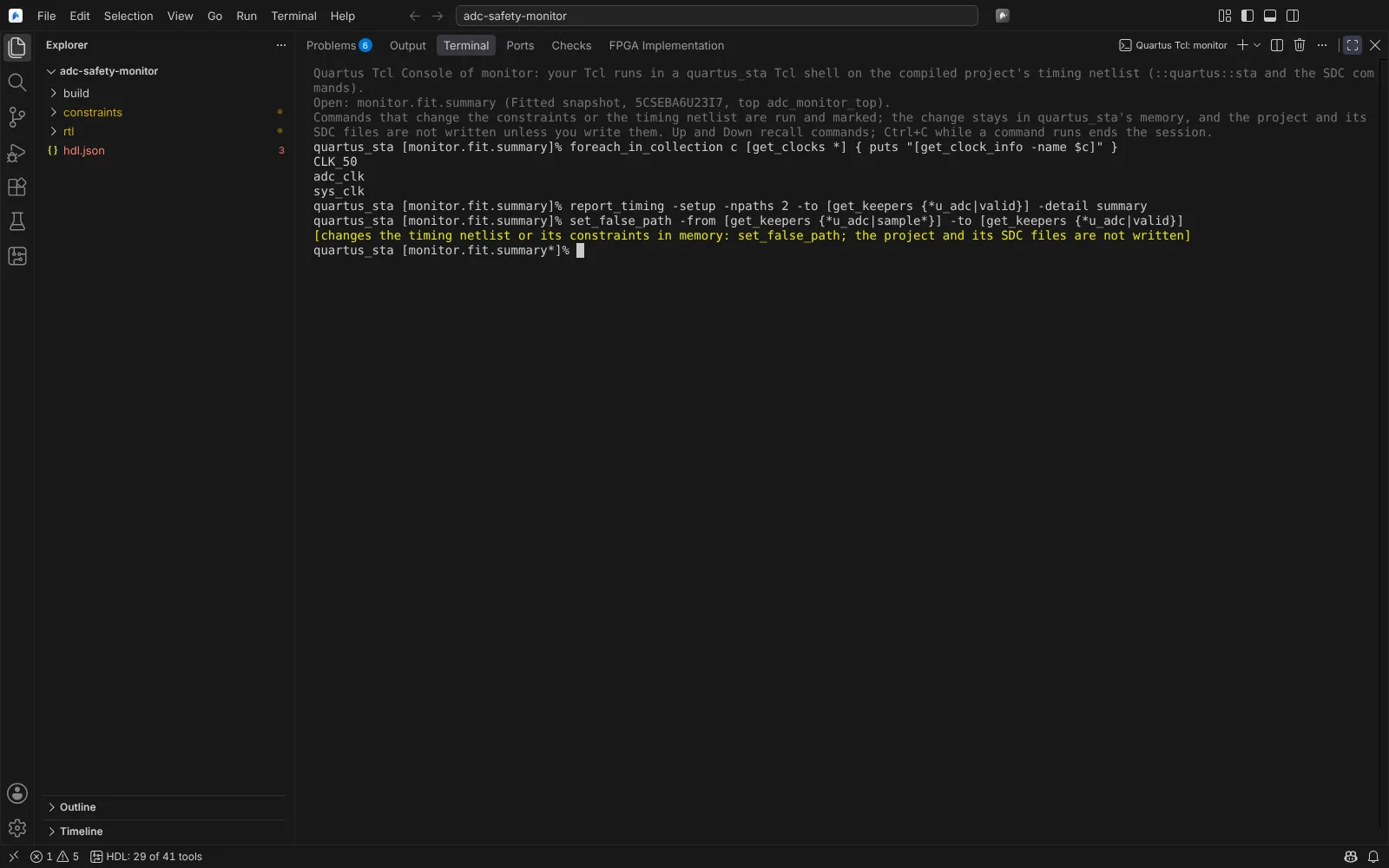 The Quartus Tcl Console on the open timing netlist, a constraint change marked
State: kit shipped; parsers tested on real quartus_sta reports (Lite 14.0 to 25.1, Pro 18.1 and 25.1.1). The CDC Viewer, ignored-constraint and metastability layouts are modelled, as no real populated report was available.
Libero SmartTime
For a Libero target, SmartTime's max and min reports appear in the same Timing Analysis editor, each path split into clock and data paths with each cell linked to its source line. Queries with a start or an end run Libero in batch.
State: kit shipped; parsers tested on real SmartTime XML.
Radiant timing
For a Radiant target, the build's timing report appears in the Timing Analysis editor. Analyze More Paths runs Radiant's timing again on the routed database with more endpoints and paths per endpoint; the new report becomes the open one.
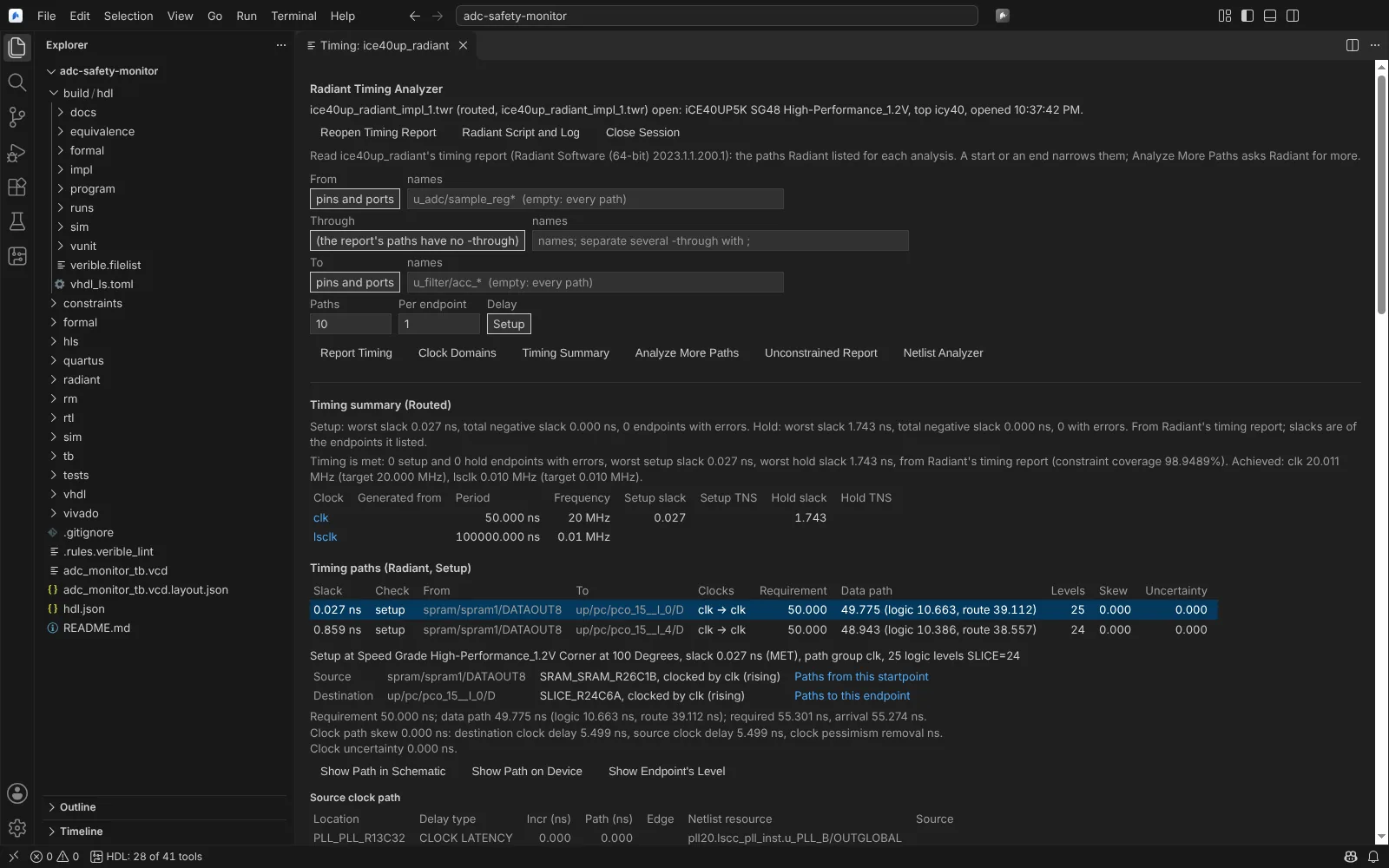 Radiant timing summary and setup paths in the shared Timing Analysis editor
State: modelled on a real Radiant 2023.1 timing report; Analyze More Paths on a stand-in.
Constraint editors
Edit Timing Constraints (Vivado)
Edit Timing Constraints shows a target's XDC as tables: clocks (create_clock), generated clocks (create_generated_clock), input and output delays, clock groups (set_clock_groups), and exceptions (set_false_path, set_multicycle_path, set_max_delay, set_min_delay). The XDC stays the record: each edit changes only the words it touches, saved at once and undone with Undo in the file. Each row can be validated in the design session. State: kit shipped.
Libero Constraint Manager
Libero: Open Constraint Manager shows, per target, which Libero tools use each constraint file (synthesis, place and route, timing verification), kept in libero.constraintTools. Derive Constraints runs derive_constraints_sdc for the clocks the design's cores make, and the result can be copied into the project. Check runs check_sdc_constraints, check_pdc_constraints, check_fdc_constraints and check_ndc_constraints for the tools that use each file, into Problems. A table edits the SDC timing constraints.
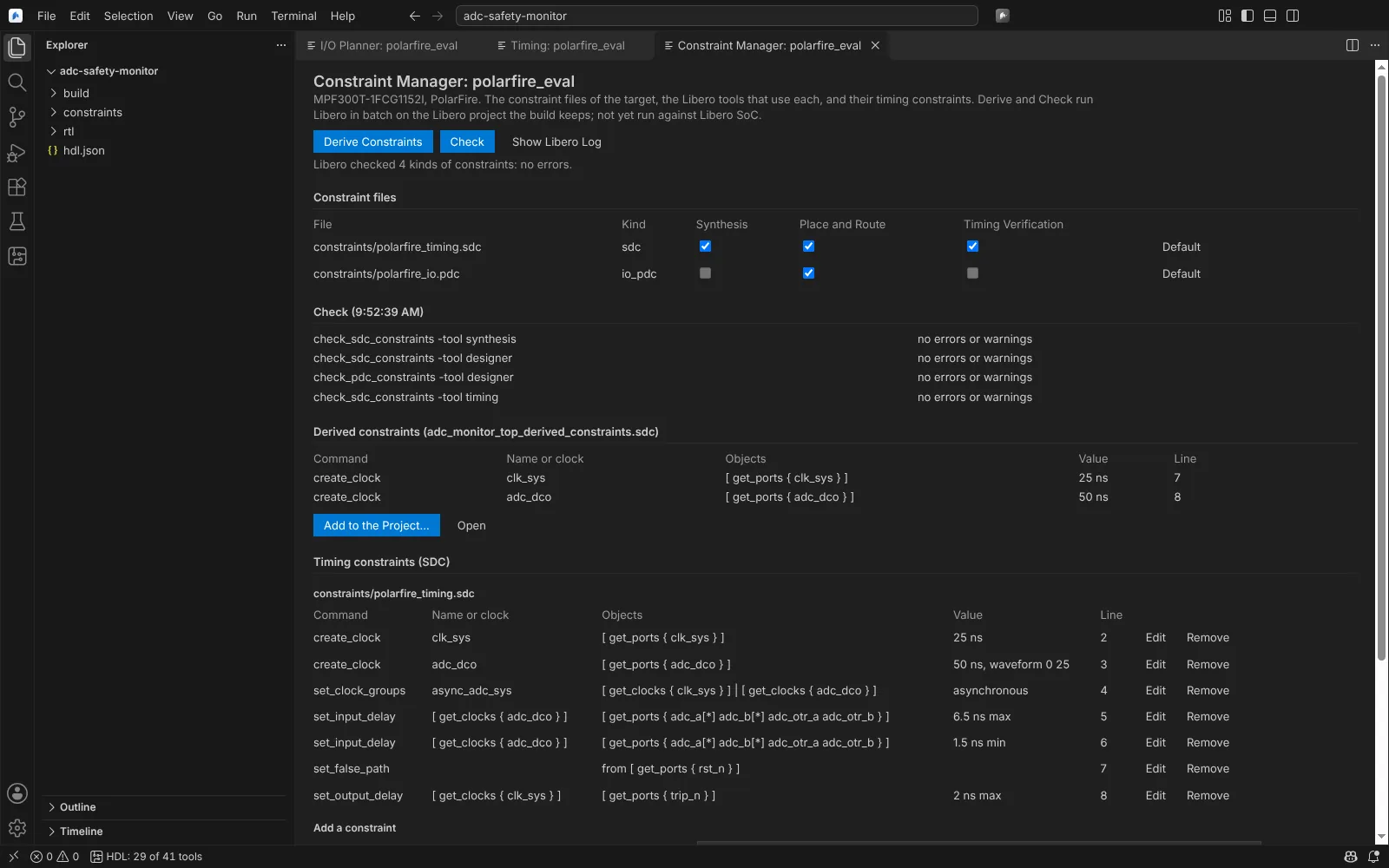 The Libero Constraint Manager: tools per constraint file, Check and Derive results, and the SDC table
State: kit shipped; parsers tested on real derived SDC and check logs.
Radiant Timing Constraint Editor
Radiant: Open Timing Constraint Editor shows the timing constraints of a Radiant target's SDC, PDC, LDC and FDC files as tables, with an add form shared with Libero's. Pins and I/O attributes are in the I/O planner.
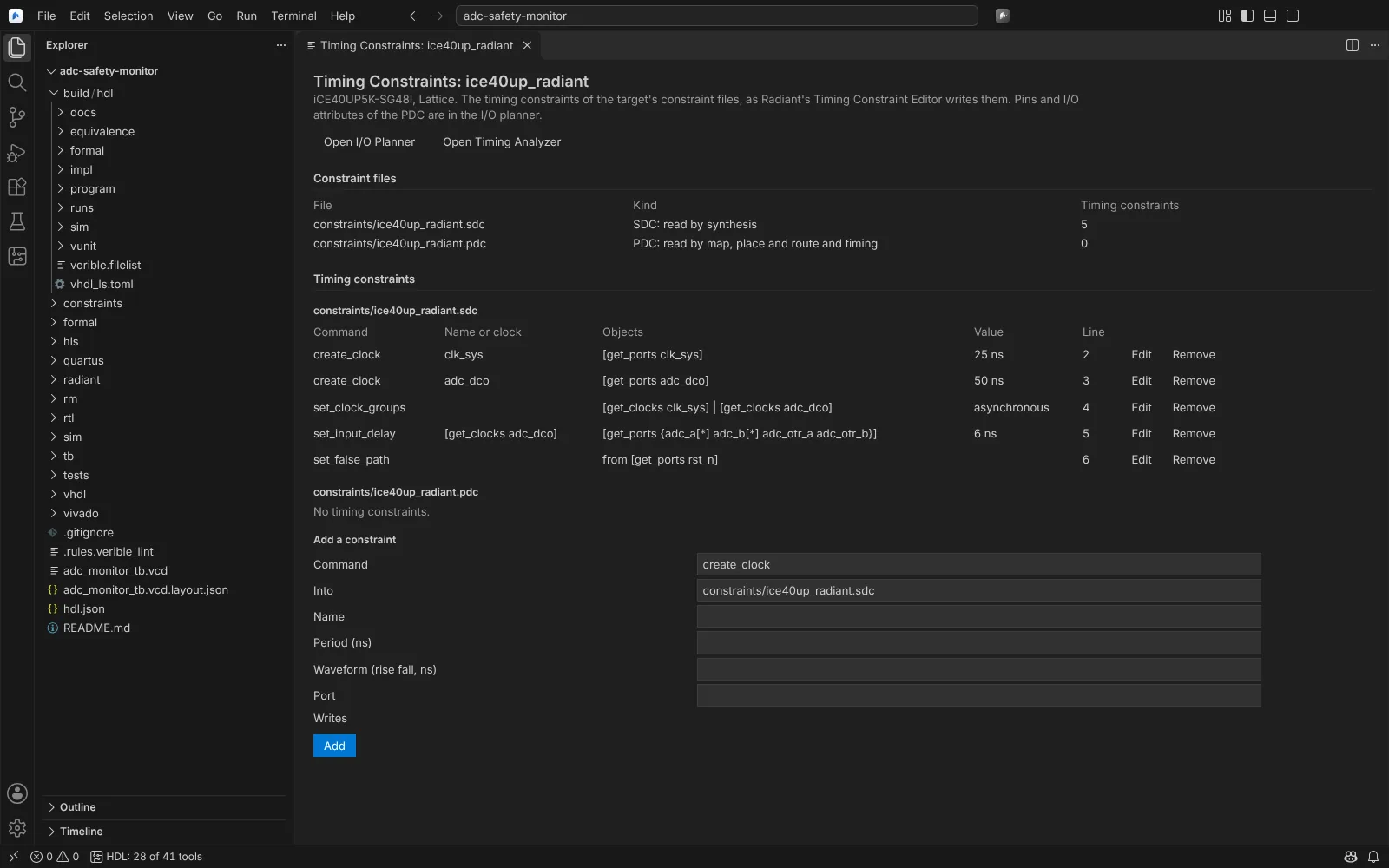 The Radiant Timing Constraint Editor with two clock domains, asynchronous groups and an input delay
State: modelled.
Quartus SDC
Quartus SDC files are edited as text; the Quartus Tcl Console tries constraints against the timing netlist before you write them.