A Vivado block design (.bd), a Quartus Platform Designer system (.qsys) or a Libero SmartDesign (.cxf) opens as a diagram in the Editor. To change it, you open it in the vendor tool's own session, on a copy: every change is the vendor's own command, and the diagram is read back after each change, so connectivity is the tool's answer, never ours.
State: not yet run against Vivado, Platform Designer or Libero SoC; kit shipped. Our readers of the files are verified on Linux on real public projects. Nothing is verified on Windows.
The diagram editor
All three formats share one editor, with Diagram and (where the tool has one) Address Editor and Interrupts tabs, Fit, zoom, and the session's state in the title bar: whether the tool made the last change, how many changes are not saved, and the last validation. Reads are read-only; changes and saves ask you to confirm when they come from an agent tool.
Vivado IP Integrator
- Open a
.bd: the diagram of its cells, interface pins, pins, nets, ports and hierarchies is read from the file (JSON or XML form). - Open Block Design in Vivado starts a Vivado session of its own on a copy.
- Edit with IP Integrator's commands: Add IP... from the IP Catalog, Add Hierarchy..., connect pins and interfaces by clicking them, Run Connection Automation... and Run Board Automation... (
apply_bd_automation). - Validate Block Design (
validate_bd_design) puts its messages in Problems on the.bd. - In the Address Editor, Assign All, or set offset and range, exclude or unassign a segment (
assign_bd_address); a value Vivado refuses keeps the old one, with its message. - Save has Vivado save the design over the project's
.bd; it is refused if the file changed on disk. Close Session ends the session.
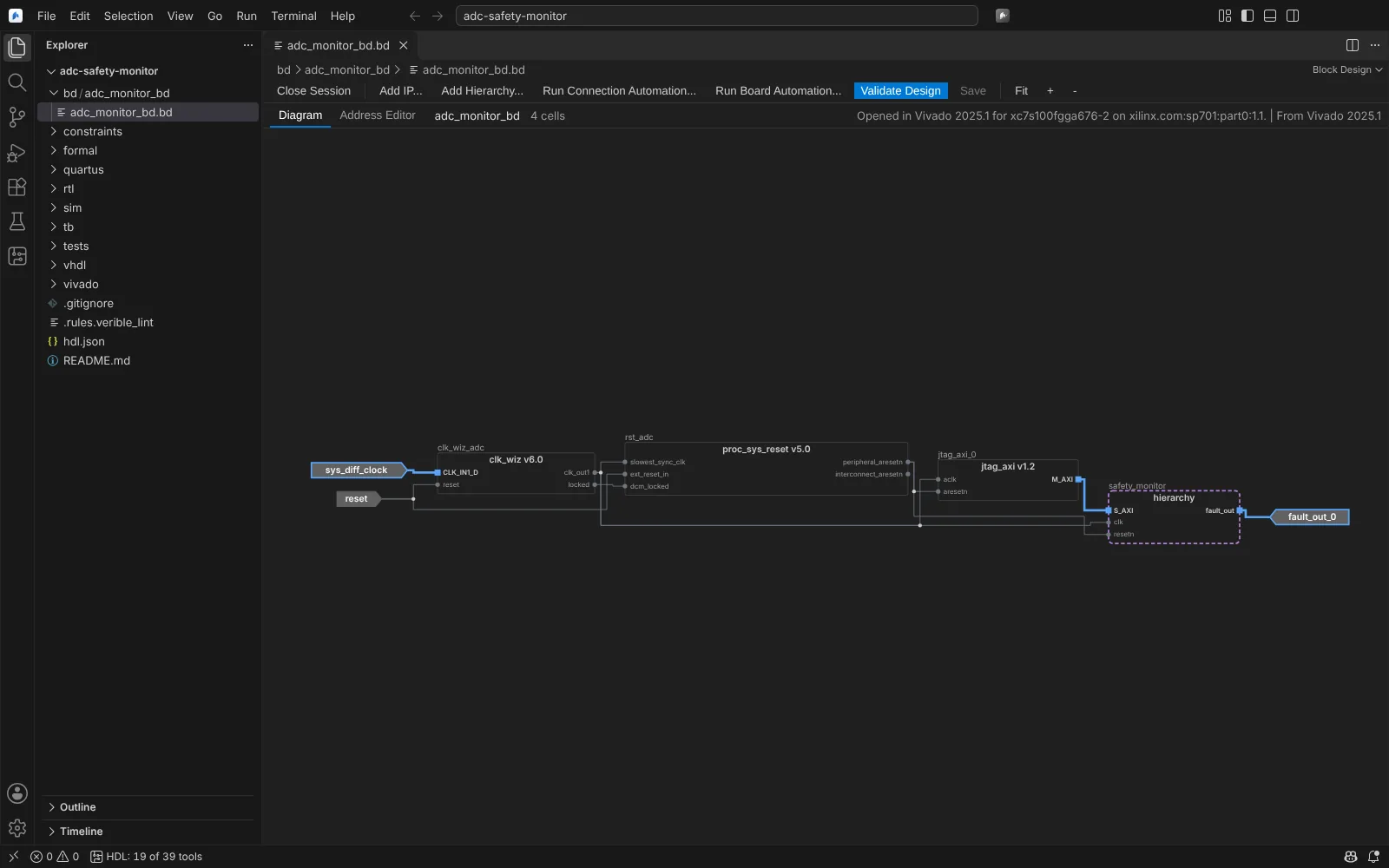 A block design opened in its Vivado session, every pin read back
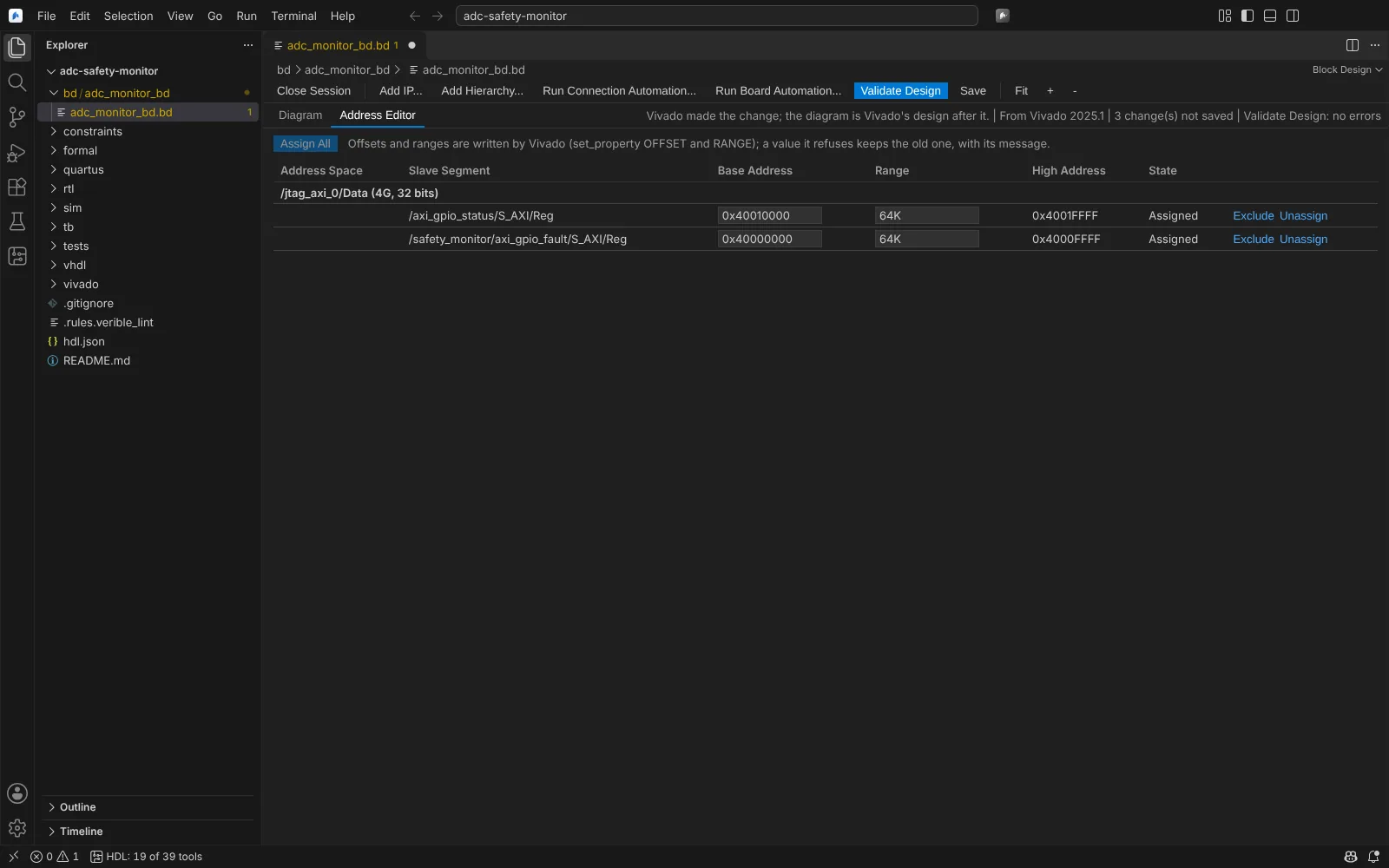 The Address Editor of a block design after Assign All
At build time, block designs of an imported project are generated in the build folder with their wrappers (read_bd, make_wrapper).
State: kit shipped; readers tested on real .bd files (Vivado 2017.3 XML, 2018.3 and 2019.2 JSON).
Quartus Platform Designer
- Open a
.qsys(Standard or Pro form) as a diagram. - Open System in Platform Designer works on a copy in the Editor's cache with
qsys-script. - Add IP... from the Quartus IP catalogue for the system's device; connect and export interfaces.
- In the Address Editor, set base addresses (the range is the slave's span), or Assign Base Addresses; a base address the tool refuses keeps the old one, with its message.
- In the Interrupts tab, set interrupt numbers per receiver.
- Validate Design (
validate_system) puts its messages in Problems; Generate runsqsys-generateon the copy. - Save writes the copy and any new
.ipfiles; it is refused if the file changed on disk.
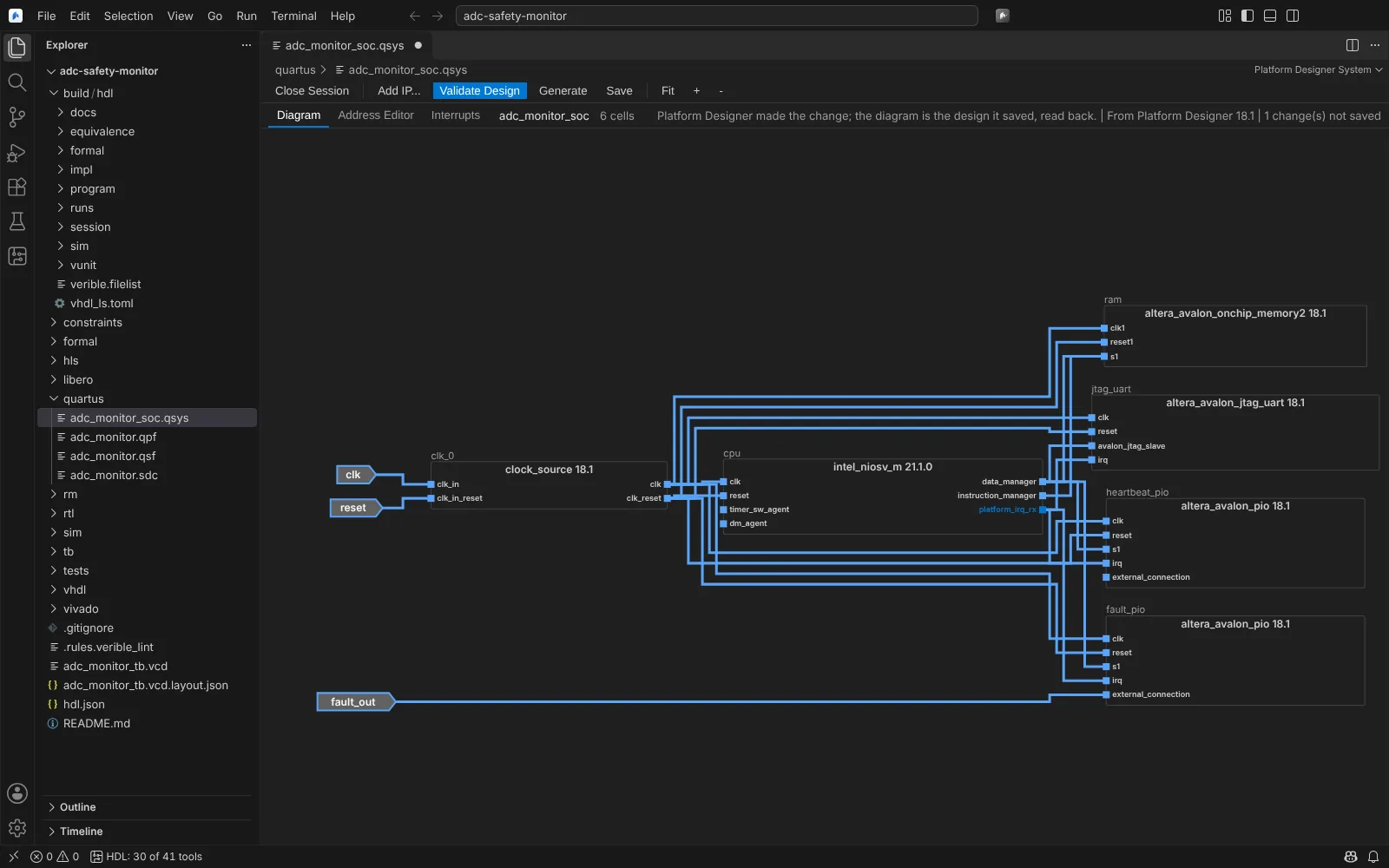 A Nios V system opened in Platform Designer, every interface read back after a change
State: kit shipped (Cyclone V with Lite or Standard). Readers tested on real Standard 18.1 and Pro 21.3 systems; Pro system edits are not in the kit.
Libero SmartDesign
- New SmartDesign... creates one, or open an existing SmartDesign's
.cxf. The.cxfalone shows the ports, since the instances are in the binary.sdb. - Open SmartDesign in Libero runs Libero in batch on a copy, with
sd_*commands, exported as Tcl and read back. - Add Component..., connect and disconnect pins, promote pins to ports, configure core instances.
- Check and Generate run
generate_componenton the copy; warnings go to Problems. - Save replays the accepted commands on the project and generates the component.
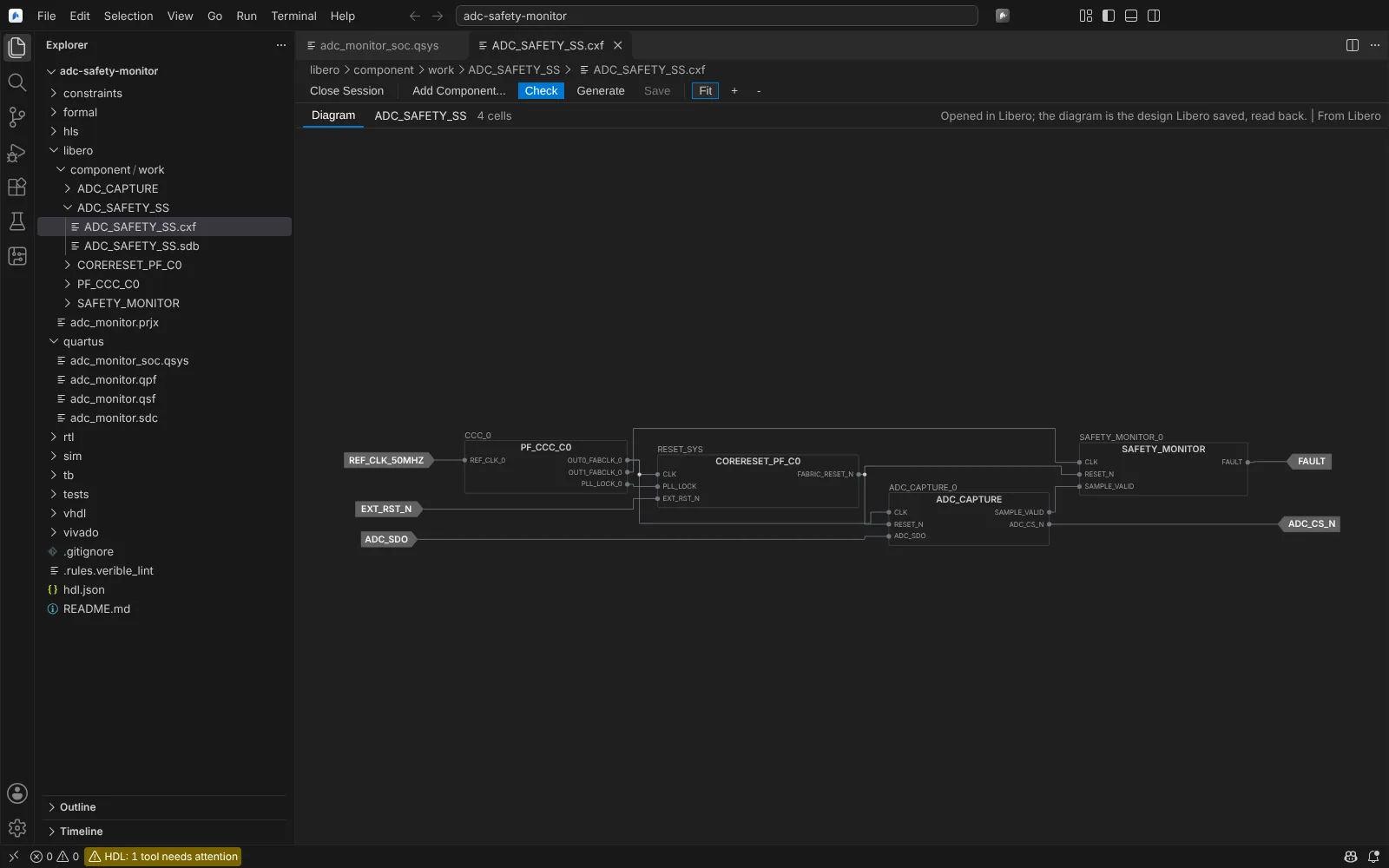 A PolarFire SmartDesign opened in Libero: instances and connections read back
State: kit shipped; readers tested on Microchip's Icicle Kit SmartDesign Tcl and a public .cxf. The canvas shows only connected pins.
Nios V software (Quartus)
A Quartus target's quartus.niosv block names the Platform Designer system, the BSP type and settings, the application sources, and the memory to initialise (file, base, end, width).
- Quartus: Build Nios V Software builds the BSP and application with
niosv-bsp,niosv-appand cmake, andelf2hexwrites the memory image into the build. - Quartus: Update Memory Initialization File and Run Assembler runs
quartus_cdb --update_mifandquartus_asm, so new software reaches the bitstream without a full compile.
Both ask you to confirm. State: kit shipped; the command lines come from search results and are checked by the kit.
Libero design initialisation
Libero: Configure Design Initialization Data and Memories opens an editor for a PolarFire target's fabric RAMs, sNVM clients, uPROM clients and initialisation settings (stage start addresses, SPI flash type and clock divider, timeouts, broadcast to zeros), kept in libero.initialization in hdl.json:
- Read Fabric RAMs has Libero list the design's RAMs as Libero names them;
- Save to hdl.json writes the settings; every Generate Bitstream writes them as Libero's
.cfgfiles and applies them; - Apply and Check in Libero configures them on the build's project and generates the data, which checks it.
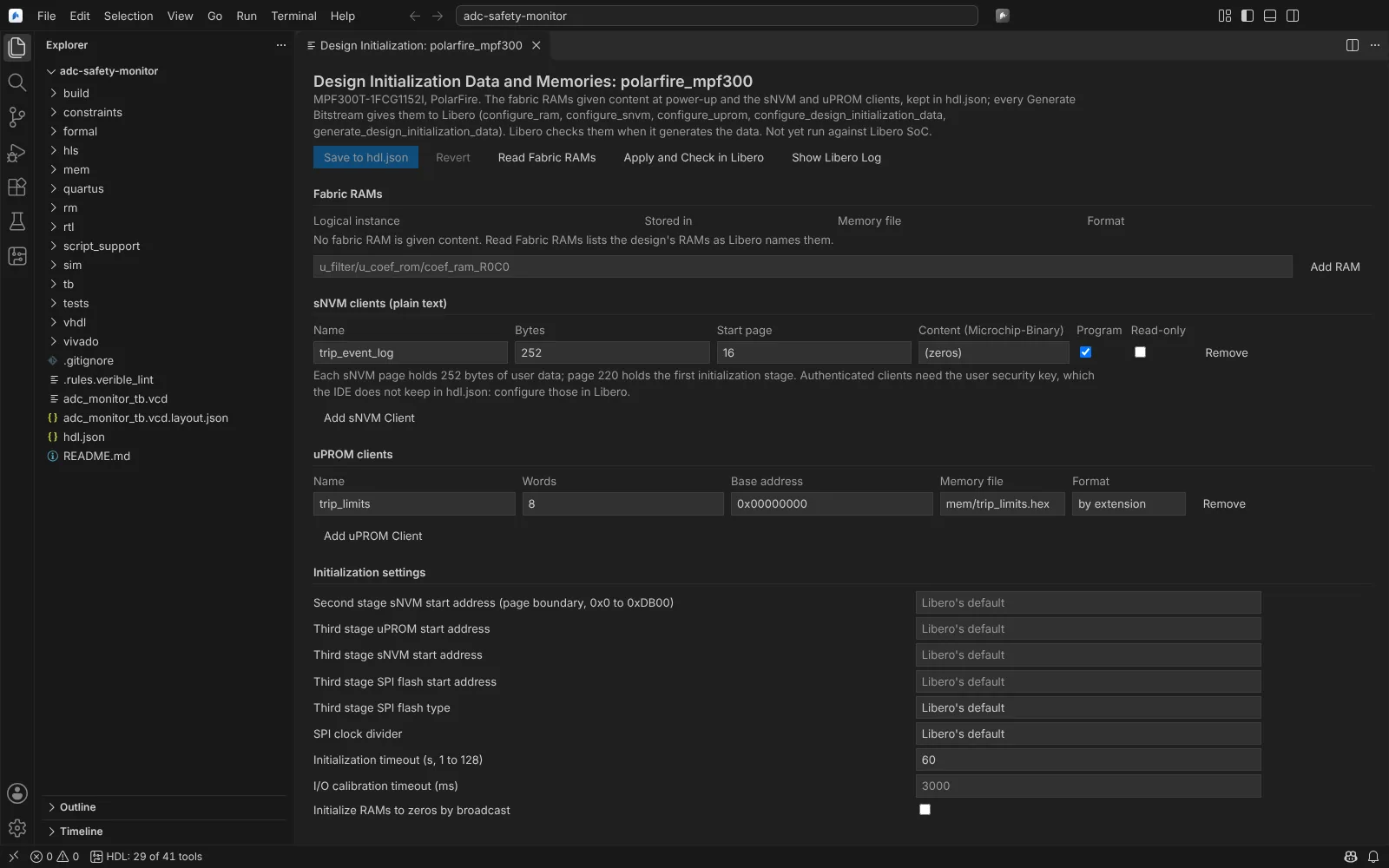 Design Initialization for a PolarFire target: an sNVM client and a uPROM client from hdl.json
State: kit shipped.