State: native runs are modelled: verified end to end on the Editor's virtual bus with the rest-bus simulation and the UDS ECU simulator over python-can. Compiled CANoe4SW test units are validated against the JSON schemas Vector published and read by the module's CANoe readers, but not yet run in CANoe (kit shipped). Not run on a real bus or ECU.
Write a test as tables
Run New Test Design.... A test design is a *.testdesign.json file in the module's documented format ("format": "neuralInverse.testDesign", "formatVersion": 1) with a JSON schema. It holds:
- test cases with an id, title, description, the requirements they verify, a variant condition (
Market == EU || Market == CN), parameters with units, parameter sets (one call per set) and steps; - sequences: named lists of steps with parameters, called from test cases and other sequences;
- a fixture: preparation before the first test case and completion after the last;
- a variant property with its values.
| Action | What it does |
|---|---|
set | Sets a signal of a simulated message through the rest-bus simulation, by physical value or value name |
setSystemVariable | Sets a CANoe system variable; runs only when compiled for CANoe (natively the test case is skipped and says so) |
send | Sends a frame once through Interactive Transmit |
wait | Waits a time |
waitFor | Waits until a signal equals a value or lies in a range, at most a timeout, and reports how long it took |
check | Checks a signal's latest value against a value or range |
diagnostic | Sends a UDS request to an ECU of the Diagnostics panel and checks the response |
setCharacteristic, checkCharacteristic | Writes or checks a calibration value of the connected XCP target or an ECU image by its A2L name |
call | Runs a sequence with arguments |
Values and limits can be parameters ({ "param": "speed" }). Signals are checked against the workspace's CAN databases as you type.
Edit in the Test Design editor
The editor shows the fixture, each sequence and each test case as a table: a row per step with its action from a list and typed cells (signal, message or target, value, expected, timeout, comment), a picker beside the signal cell with the open databases' signals and value names, parameter sets as a grid, and the last result of each step. Each edit is one undoable edit of the file's text; Alt+Up and Alt+Down move steps. Add Test Case to Test Design and Show Test Design Source Text are in the title bar.
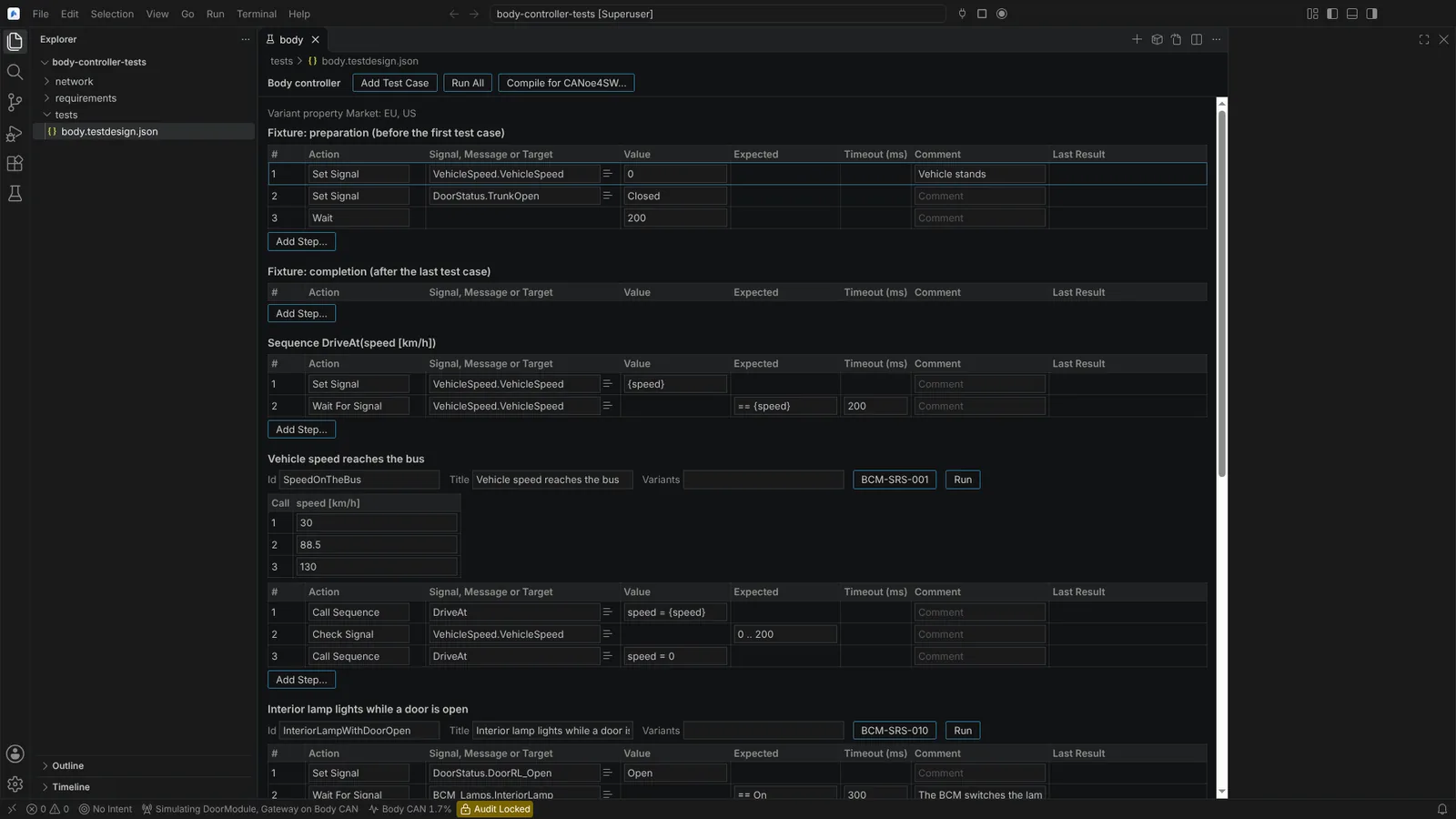 A test design: the fixture, a sequence and a test case with three parameter sets, each step a row of typed cells.
Run it natively
In the Testing view, Test designs lists each design with its test cases at their lines (run profile Run Natively). A design, a test case or one call runs against the Editor's services: signals through the rest-bus simulation, frames through Interactive Transmit, waits and checks through the bus monitor, diagnostic requests through the ECU definitions, calibration values through the connected XCP target.
- A run asks for the variant when needed (Choose Test Design Variant... sets it beforehand).
- Before anything is sent, one confirmation names every action that reaches a real bus, every diagnostic request that changes an ECU and every calibration write, with its channel or ECU and interface, and the design's path and SHA-256. Declined, nothing runs.
- A failed check fails its test case and the run goes on; each step's result shows at its row with what was observed ("InteriorLamp == On not reached within 300 ms; it was Off (0).").
Every run writes a record into build/test-designs/<design>/<start time>.json (never replacing another). Save Test Design Report... writes the latest run's report (an HTML page, CSV tables, the record and a provenance file with SHA-256 values) and opens it in the Integrated Browser. Requirements named in a test case are its links in Requirements Coverage.
Compile for CANoe4SW Server Edition
Compile Test Design for CANoe4SW Server Edition... writes into a folder you choose a test unit (.vtestunit.yaml), its test tree (.vtesttree.yaml), a CAPL file (.can) and <name>.compile.json with what was compiled and what not, and why. Each file is at the lowest format version its content needs. A test case becomes an export testcase, one with several parameter sets a capl-test-case-list with param-vectors, the fixture a test-fixture, a sequence a function. Steps that send a frame, a diagnostic request or a calibration value are not compiled, and their test cases are listed with the reason. The generated files say they are yours to use, modify and ship.
Agents use listTestDesigns, runTestDesign (every action on a real bus or that changes an ECU confirmed every time) and compileTestDesignForCanoe.
Not verified: how CANoe takes two-argument TestStepPass, physical signal values, {CallIndex} titles and fixture preparation (asked in the kit). Natively, CANoe system variables are not set.