The HDL module gives FPGA and ASIC engineers the functions of a vendor IDE inside the Editor: Verilog, SystemVerilog and VHDL with language servers and lint, testbenches (including cocotb and VUnit) and formal proofs in the Testing view, a waveform viewer, the elaborated design (hierarchy, schematics, state machines, clock domain crossings), FPGA builds from synthesis to a programmed board, timing closure, I/O planning, IP and system design, hardware debug, and an ASIC flow from RTL to GDS. It drives your installed tools; it does not reimplement them.
Two kinds of tool are driven:
- Open tools: Verilator, Icarus Verilog, GHDL and NVC for lint and simulation; Yosys and nextpnr for synthesis and place and route; openFPGALoader for programming; Verible or svls and vhdl_ls for language support; SymbiYosys and eqy for formal work; OpenROAD, KLayout, Magic and netgen for ASICs.
- Vendor tools, in batch mode: AMD Vivado (and Vitis HLS), Altera (Intel) Quartus Prime, Microchip Libero SoC with FlashPro Express, and Lattice Radiant with Radiant Programmer. The Editor writes the Tcl, runs the tool, and reads its messages and reports into the same views as the open flow.
Verification state: read this first
Every page in this section states the state of each capability. The states are:
| State | Meaning |
|---|---|
| Verified (Linux) | Run on Linux against the real open tool, or our own reader or writer run on real files, with the versions the page names |
| Kit shipped | Not yet run against the vendor tool. The generated scripts are tested line by line and on stand-ins for the tool, and a verification kit runs the same scripts on a real installation; no report has come back |
| Modelled | Not yet run against the vendor tool and not in a kit: tested against documentation, published samples or stand-in processes only |
| Not built | Listed on What's next, never on the task pages |
In summary:
| Area | State |
|---|---|
| Open flow (lint, simulation, cocotb, VUnit, formal, waveforms, elaboration, schematics, state machines, CDC, synthesis and place and route for iCE40, ECP5, Gowin and AMD 7-series through openXC7, I/O planner, PLL, runs, ASIC RTL to GDS) | Verified on Linux with the tool versions each page names |
Our readers and writers of vendor files (.xpr, .qsf, .prjx, .rdf, .bd, .qsys, .xci, .ip and others) | Verified on Linux on real public project files; the vendor tool reading what we wrote is kit shipped |
| Vivado, Quartus, Libero SoC and Radiant runs | Kit shipped or modelled: not yet run against the vendor tools |
| Programming a board (openFPGALoader or a vendor programmer) and every hardware debug function | Not run on a board |
| Windows | Nothing is verified on Windows |
| Customers | No capability is verified by a customer |
The vendor paths wait on a machine with the free vendor editions and boards, and on the Vivado kit's results from a tester with Vivado on Windows. Do not rely on a vendor path for production work until it is verified for your tool release and operating system. See Vendor tools and verification kits for the kits, and Domain modules for what the states mean across modules.
Turn it on
HDL is off until you enable it:
- Open the folder with your design and trust the workspace.
- Run Neural Inverse: Enable HDL Environment, or set
neuralInverse.hdl.enabledtotruein the workspace settings.
A workspace with an hdl.json or with Verilog, SystemVerilog or VHDL sources gets a one-time offer to enable it. It is never enabled automatically. Disable HDL Environment turns it off for the workspace. Features start only in a trusted workspace, because they run the tools the workspace names.
With the setting off, only syntax colouring for .v, .vh, .sv, .svh, .vhd and .vhdl and the constraint languages (PCF, LPF, CST, SDC and XDC) runs: no processes, views or prompts beyond the one-time offer.
Once on, the status bar shows HDL: n of m tools; click it, or run Show HDL Tools, to see which tools were found and how to point the Editor at the others.
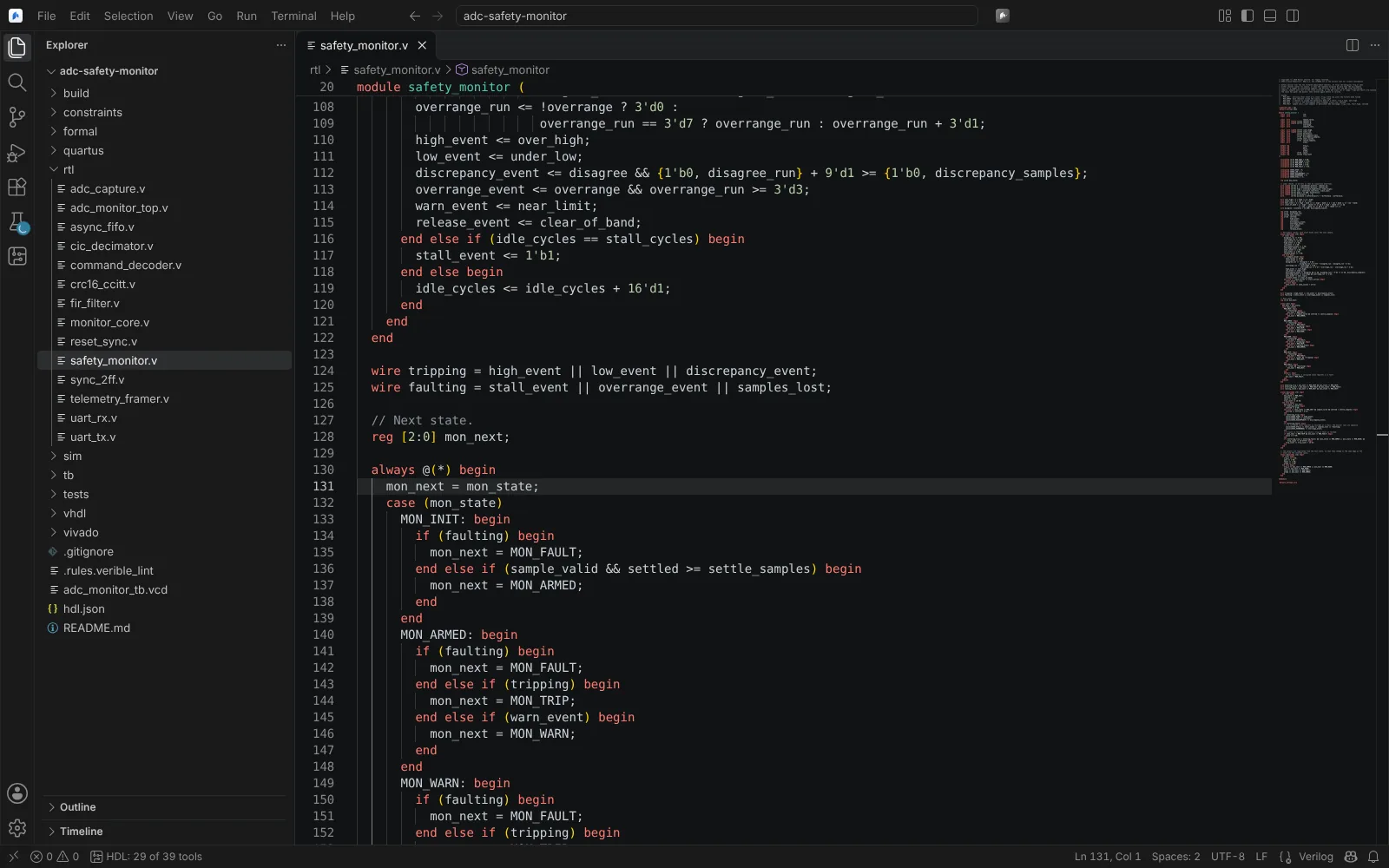 A Verilog file in the editor, with the number of HDL tools found in the status bar
Where things appear
| Where | What |
|---|---|
| Problems | Lint, constraint checks, build messages, DRC, methodology and Design Assistant findings |
| Testing view | Testbenches, cocotb tests, VUnit cases, vendor simulation sets, SymbiYosys tasks, equivalence checks |
| Side bar, HDL | Project Sources, Libraries and Compile Order for vendor projects; Language Templates; Design Hierarchy |
| Panel, FPGA Implementation | Targets, flow steps, utilisation, clocks, paths, power, messages, build history |
| Editors for files | Waveform Viewer (VCD, FST), Layout Viewer (GDSII, OASIS), block design diagrams (.bd, .qsys, SmartDesign .cxf) |
| Editors per design or target | RTL Schematic, State Machines, Timing Analysis, I/O Planner, Device View, Implementation Runs, IP Catalog, Customize IP, Hardware Debug, Serial I/O, Logic Analyzer, Chip, and vendor editors such as the Assignment Editor and the Constraint Manager |
| Terminal | Vivado and Quartus Tcl consoles on an open design |
| Status bar | Tools found, and missing tools with install hints |
All commands are in the Command Palette under Neural Inverse HDL.
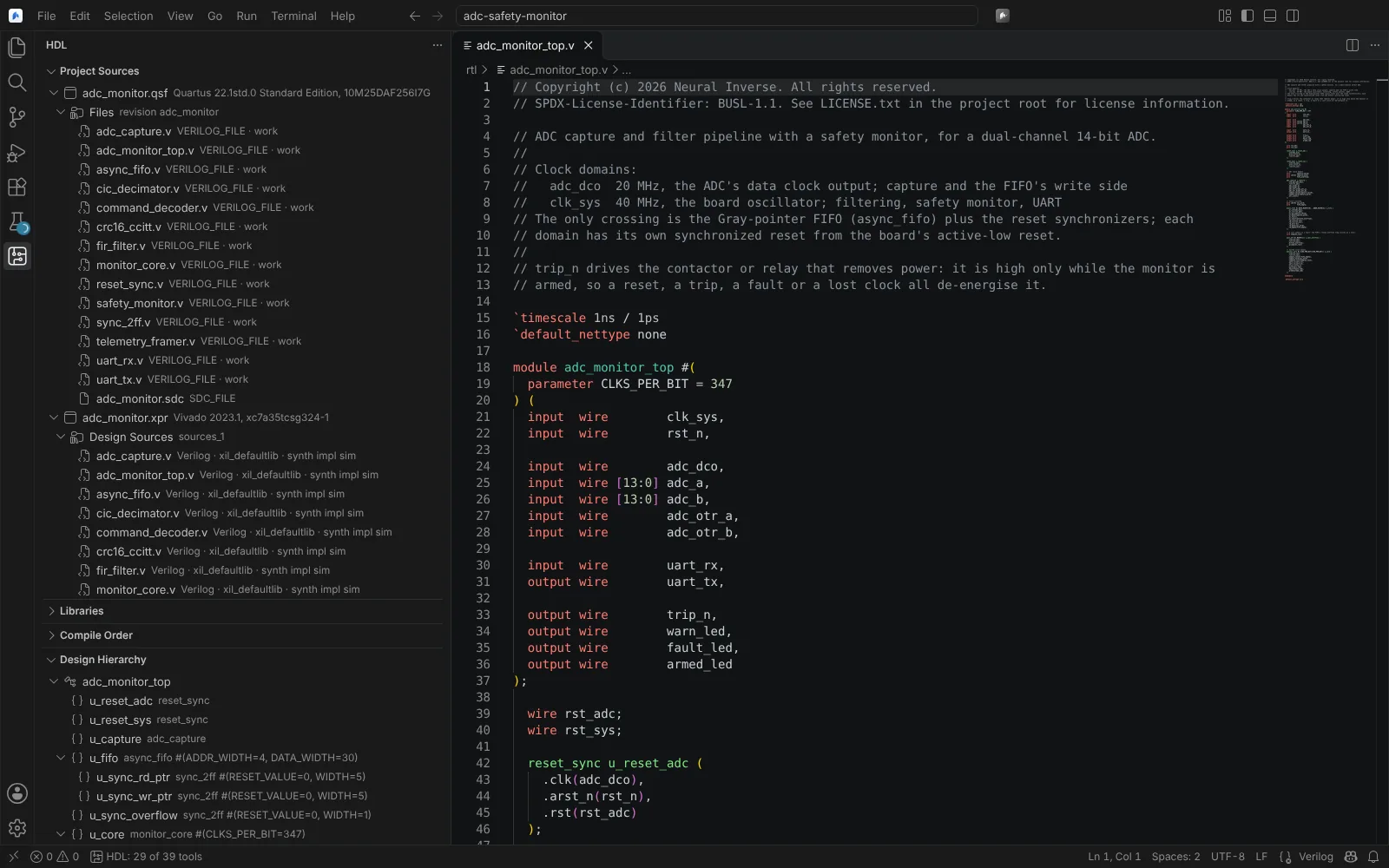 The HDL side bar with a Quartus revision's and a Vivado project's sources and the design hierarchy
Pages in this section
Set up:
- Requirements and project setup: tools and licences, how tools are found,
hdl.json, target families, the example project. - New project from a part or board: the New Project wizard and its part and board catalogues.
- Open and edit vendor projects: importing Vivado, Quartus, Libero, Gowin and Lattice projects, and editing
.xpr,.qsf,.prjxand.rdffiles in place.
Design and verify:
- Edit HDL and constraints: language servers, lint, constraint checks, templates and vendor keymaps.
- Simulate and test: testbenches on the open simulators, cocotb, VUnit, and vendor simulators.
- Formal proofs and equivalence: SymbiYosys, equivalence checks, property templates.
- Waveforms: the waveform viewer and its layouts.
- Hierarchy, schematics and state machines: the elaborated and synthesised design, vendor netlist views, design documentation.
Implement:
- Build with the open FPGA flow: Yosys and nextpnr, openXC7, reports, build history, PLLs, strategies and runs.
- Build with Vivado, Quartus, Libero and Radiant: batch builds, flow steps, messages, DRC and waivers, power, incremental and out-of-context runs.
- Timing analysis and constraints: the Timing Analysis editor, clock domain crossings, vendor timing sessions and constraint editors.
- I/O planning: the I/O planner for every family, the Quartus periphery plan, Report Noise.
- Device view and floorplanning: placement, routes, Pblocks, Logic Lock and Libero regions.
- IP, packaging and HLS: IP catalogues, Customize IP, Libero cores, Radiant IP, Create and Package IP, Vitis HLS.
- Block designs and SoC systems: IP Integrator, Platform Designer, SmartDesign, Nios V software, Libero design initialisation.
Program and debug:
- Program the board: Program FPGA Board, configuration memory, vendor programmers.
- Hardware debug: the built-in logic analyser, ILA and VIO, Signal Tap, In-System Sources and Probes, Reveal, SmartDebug, serial I/O.
- ECO and partial reconfiguration: Vivado ECOs, Dynamic Function Exchange, Quartus Pro partial reconfiguration.
ASIC, vendors and reference:
- ASIC: RTL to GDS: the open ASIC flow on IHP SG13G2, SKY130 and GF180MCU.
- Vendor tools and verification kits: what each vendor path covers, its state, and the kits that verify it.
- Reference and troubleshooting: settings,
hdl.jsonkeys, file formats, confirmations and records, common problems. - What's next: what is not built yet.
The same tools in the CLI
The CLI's hardware environment has hdl_project, hdl_lint and hdl_sim, reading the same hdl.json. See the CLI.