The selected device drives the rest: its CMSIS pack brings the SVD file for peripheral registers, the memory map for the size report and new projects, the flash sector layout for sector erase, and the pins for pin configuration.
Device packs
The device, its memory and its SVD file come from CMSIS device family packs, as Keil's Pack Installer and Select Device provide them:
- Update Device Pack Index fetches the pack index (or reads your mirror; see offline use).
- Install Device Family Pack... installs a pack with cpackget. Its embedded licence is shown for your agreement first.
- Select Device... sets
neuralInverse.embedded.device, asVendor::DeviceorDevice, for exampleSTMicroelectronics::STM32F407VG, and installs the device's pack when it is not installed yet. The status bar shows the device and its system clock.
neuralInverse.embedded.packs.root names the pack root; when empty, CMSIS_PACK_ROOT or the default of cpackget, Keil MDK and the CMSIS-Toolbox is used (%LOCALAPPDATA%\Arm\Packs on Windows, ~/.cache/arm/packs elsewhere). An installed Keil MDK pack root is read in place.
State: unit-tested; the pack integration test exists and did not run in the audit. cpackget, the pack index and a corporate proxy have not been exercised in a verified run.
Pins
The Pin Configuration editor (Open Pin Configuration) shows the package of the MCU with each pin's function and label, and a table of the assigned pins with their function, label and alternate function, from ST's open pin data or a local STM32CubeMX database:
- Download STM32 Pin Data clones ST's STM32_open_pin_data (or set
neuralInverse.embedded.pins.dataPathto a copy or to an installed STM32CubeMX'sdbfolder). - Select MCU for Pin Configuration... picks the part and package.
- Click a pin, or run Assign Pin Function..., to give it a mode (input, output, analog, EXTI) or an alternate function, and a label. Conflicts are shown. The configuration is saved to
neuralInverse.embedded.pins.file(defaultpins.json, relative to the folder ofCMakePresets.json). - Generate Pin Header writes
neuralInverse.embedded.pins.header(defaultpins.h): the port, pin number, mask and alternate function of each assigned pin, with your organisation's file header.
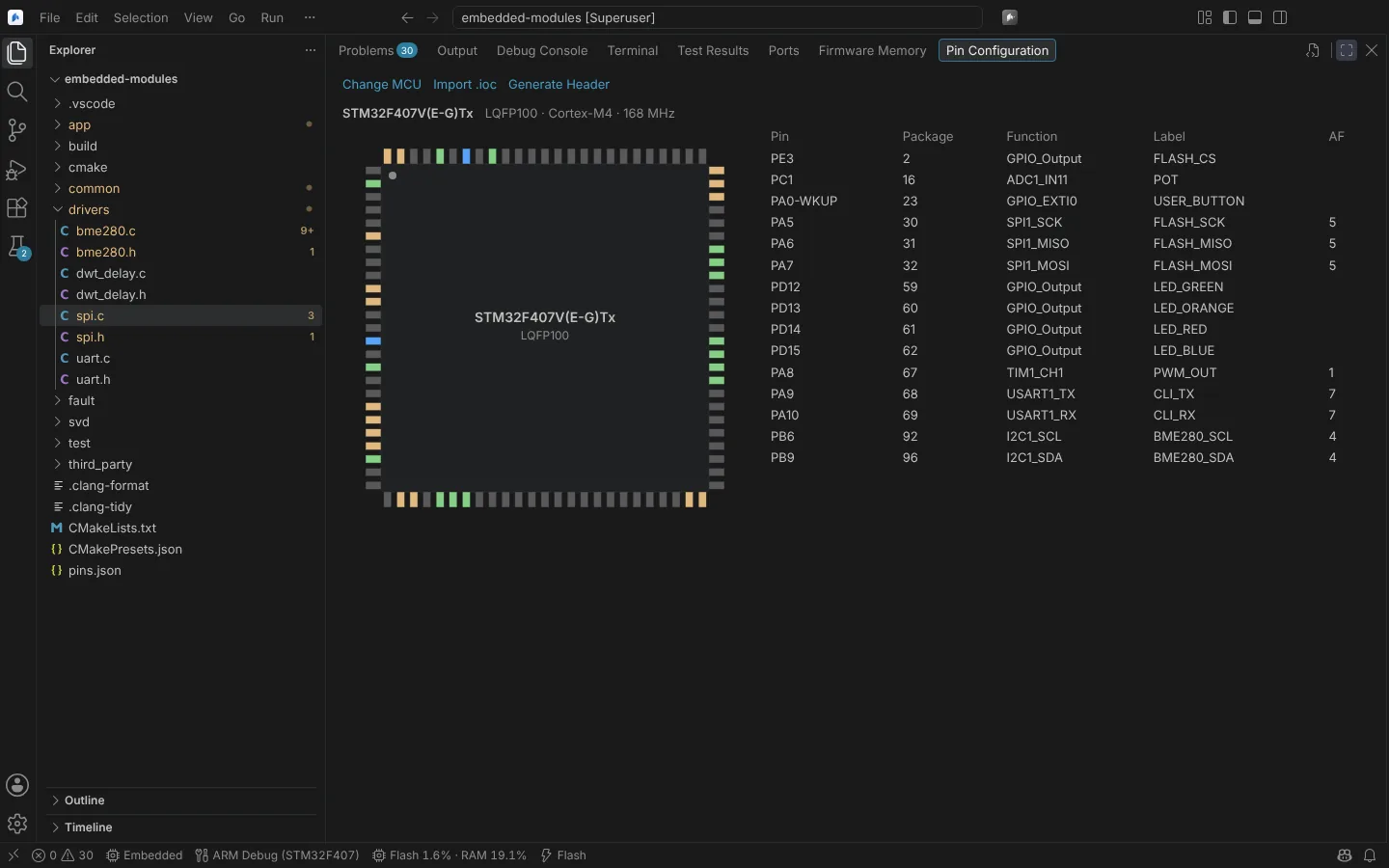 The Pin Configuration editor for an STM32F407 in LQFP100, with each assigned pin, its function, label and alternate function.
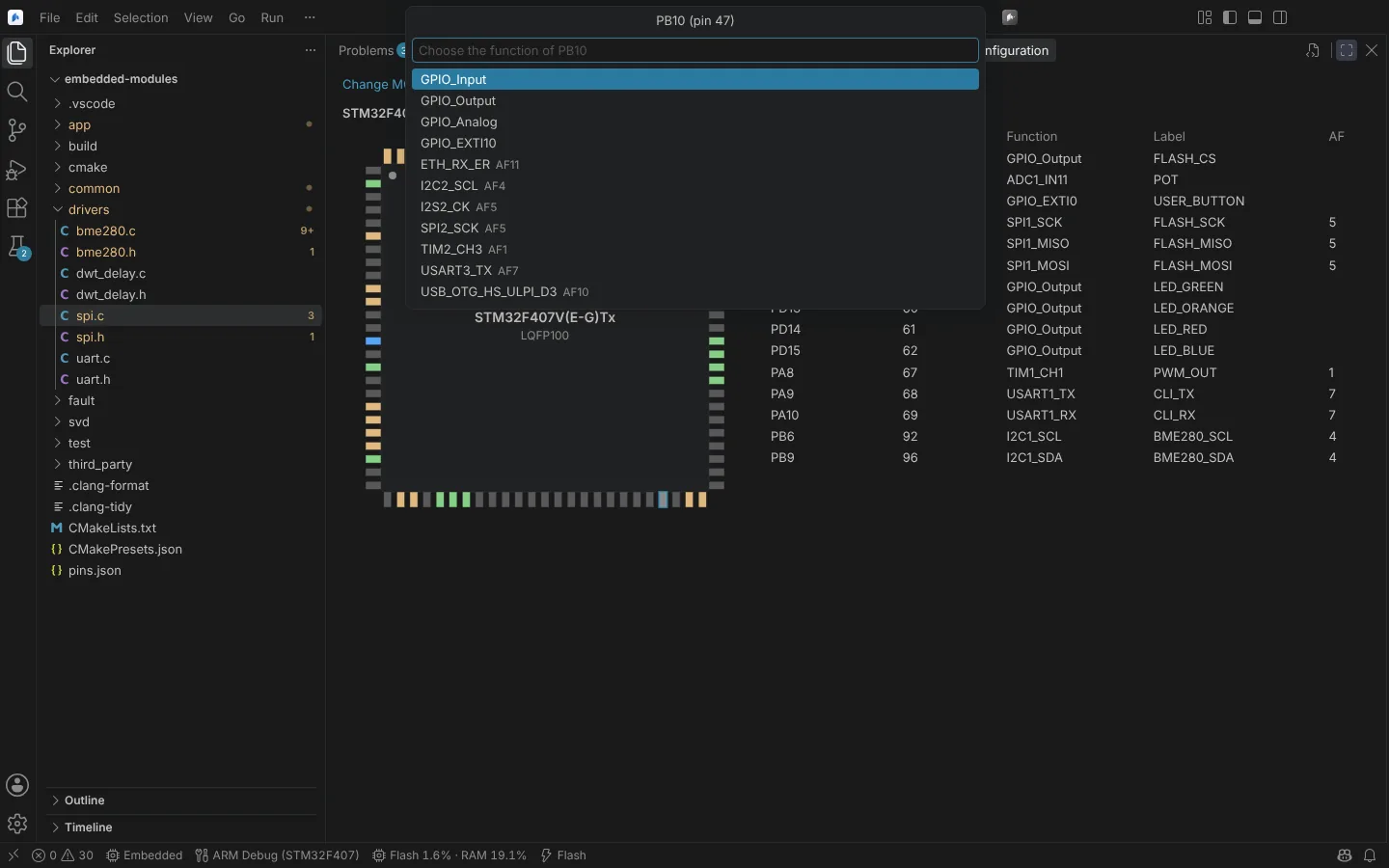 Choosing the function of pin PB10 from its modes and alternate functions, each with its AF number.
To start from an STM32CubeMX project, right-click its .ioc file and choose Import Pin Configuration, or run Import Pins from STM32CubeMX Project (.ioc).... .ioc files also open in the Pinout editor, read-only.
State: unit and rendering tests; cloning ST's pin data is not exercised in a verified run.
Clock check
Show Clock Setup reads the clock configuration the project's code sets (its SystemClock_Config) against the project's own CMSIS device header and HAL RCC headers, and shows the resulting system and bus clocks. A bad PLL setting or a bus over its limit becomes a Problem.
Bus clock limits are checked for STM32F405 and STM32F407 only, from the DS8626 datasheet. Other devices say which limits were not checked.
State: unit-tested; limits for STM32F405 and STM32F407 from DS8626.