Cookbook: OpenAI Integration (JS/TS)


This cookbook provides examples of the Neural Inverse Integration for OpenAI (JS/TS). Follow the integration guide to add this integration to your OpenAI project.
Set Up Environment
Get your Neural Inverse API keys by signing up for Neural Inverse Cloud or self-hosting Neural Inverse. You’ll also need your OpenAI API key.
Note: This cookbook uses Deno.js for execution, which requires different syntax for importing packages and setting environment variables. For Node.js applications, the setup process is similar but uses standard
npmpackages andprocess.env.
// Neural Inverse authentication keys
Deno.env.set("LANGFUSE_PUBLIC_KEY", "pk-lf-***");
Deno.env.set("LANGFUSE_SECRET_KEY", "sk-lf-***");

// Neural Inverse host configuration
// Other Neural Inverse data regions include 🇺🇸 US: https://us.cloud.langfuse.com, 🇯🇵 Japan: https://jp.cloud.langfuse.com and ⚕️ HIPAA: https://hipaa.cloud.langfuse.com
Deno.env.set("LANGFUSE_BASE_URL", "https://cloud.langfuse.com")

// Set environment variables using Deno-specific syntax
Deno.env.set("OPENAI_API_KEY", "sk-proj-***");
With the environment variables set, we can now initialize the langfuseSpanProcessor which is passed to the main OpenTelemetry SDK that orchestrates tracing.
// Import required dependencies
import 'npm:dotenv/config';
import { NodeSDK } from "npm:@opentelemetry/sdk-node";
import { LangfuseSpanProcessor } from "npm:@langfuse/otel";

// Export the processor to be able to flush it later
// This is important for ensuring all spans are sent to Neural Inverse
export const langfuseSpanProcessor = new LangfuseSpanProcessor({
    publicKey: process.env.LANGFUSE_PUBLIC_KEY!,
    secretKey: process.env.LANGFUSE_SECRET_KEY!,
    baseUrl: process.env.LANGFUSE_BASE_URL ?? 'https://cloud.langfuse.com', // Default to cloud if not specified
    environment: process.env.NODE_ENV ?? 'development', // Default to development if not specified
  });

// Initialize the OpenTelemetry SDK with our Neural Inverse processor
const sdk = new NodeSDK({
  spanProcessors: [langfuseSpanProcessor],
});

// Start the SDK to begin collecting telemetry
// The warning about crypto module is expected in Deno and doesn't affect basic tracing functionality. Media upload features will be disabled, but all core tracing works normally
sdk.start();
Example 1: Chat Completion
import OpenAI from "npm:openai";
import { observeOpenAI } from "npm:@langfuse/openai";
// Initialize OpenAI client with observerOpenAI wrapper
const openai = observeOpenAI(new OpenAI());import OpenAI from "npm:openai";
import { observeOpenAI } from "npm:@langfuse/openai";
// Configured via environment variables, see above
const openai = observeOpenAI(new OpenAI());
const completion = await openai.chat.completions.create({
model: 'gpt-4o',
messages: [{ role: "system", content: "Tell me a joke." }],
max_tokens: 100,
});
console.log(completion.choices[0]?.message.content);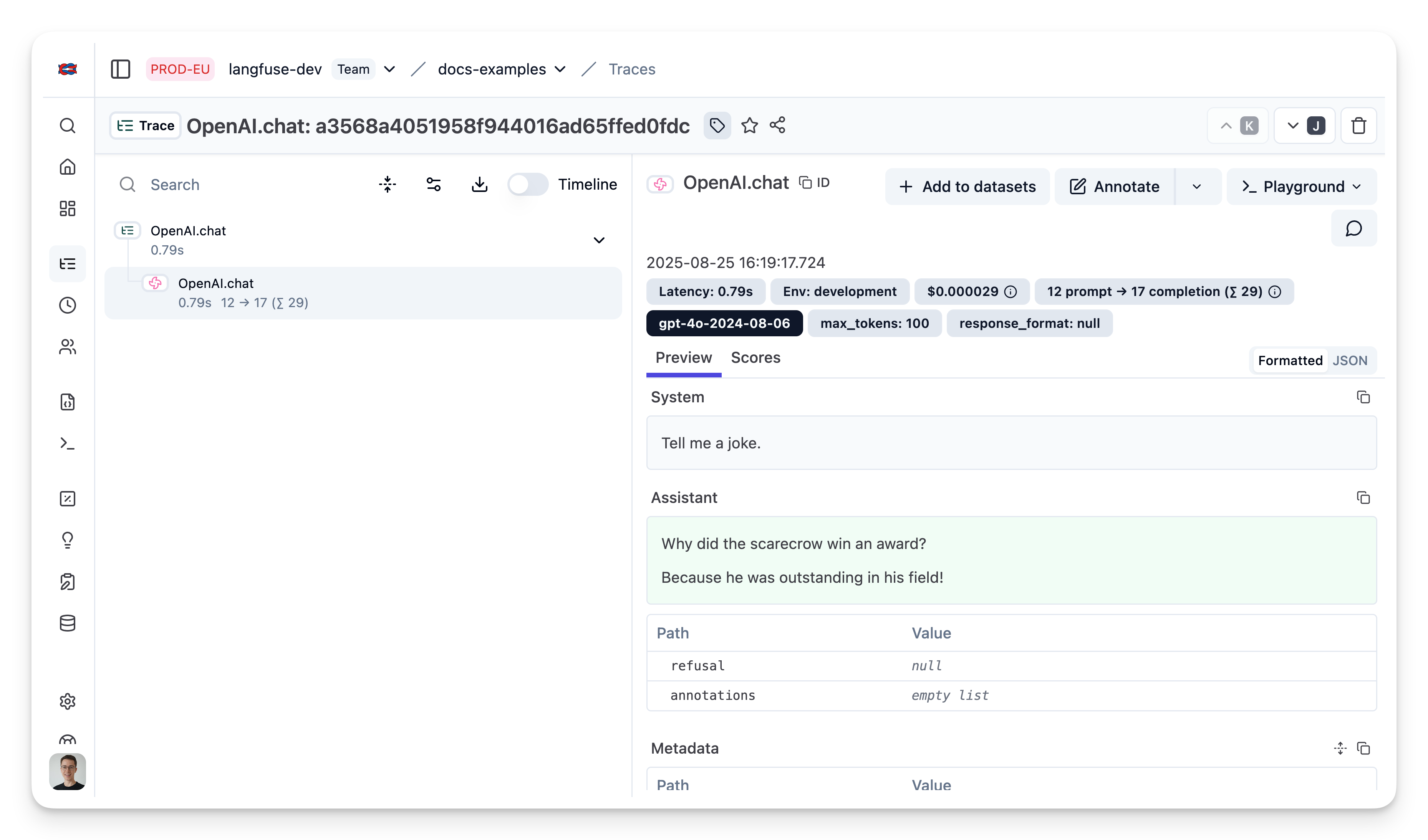
Public trace in the Neural Inverse UI
Example 2: Chat completion (streaming)
Simple example using OpenAI streaming, passing custom parameters to rename the generation and add a tag to the trace.
import OpenAI from "npm:openai";
import { observeOpenAI } from "npm:@langfuse/openai";

// Initialize OpenAI SDK with Neural Inverse
const openaiWithLangfuse = observeOpenAI(new OpenAI(), { generationName: "OpenAI Stream Trace", tags: ["stream"]} )

// Call OpenAI
const stream = await openaiWithLangfuse.chat.completions.create({
  model: 'gpt-4o',
  messages: [{ role: "system", content: "Tell me a joke." }],
  stream: true,
});

for await (const chunk of stream) {
    const content = chunk.choices[0]?.delta?.content || '';
    console.log(content);
  }
Public trace in the Neural Inverse UI
Example 3: Add additional metadata and parameters
The trace is a core object in Neural Inverse, and you can add rich metadata to it. Refer to the JS/TS SDK documentation and the reference for comprehensive details.
Example usage:
- Assigning a custom name to identify a specific trace type
- Enabling user-level tracking
- Tracking experiments through versions and releases
- Adding custom metadata
import OpenAI from "npm:openai";
import { observeOpenAI } from "npm:langfuse";

// Initialize OpenAI SDK with Neural Inverse and custom parameters
const openaiWithLangfuse = observeOpenAI(new OpenAI(), {
    generationName: "OpenAI Custom Trace",
    metadata: {env: "dev"},
    sessionId: "session-id",
    userId: "user-id",
    tags: ["custom"],
    version: "0.0.1",
    release: "beta",
})

// Call OpenAI
const completion = await openaiWithLangfuse.chat.completions.create({
  model: 'gpt-4o',
  messages: [{ role: "system", content: "Tell me a joke." }],
  max_tokens: 100,
});
Public trace in the Neural Inverse UI
Example 4: Function Calling
import OpenAI from "npm:openai";
import { observeOpenAI } from "npm:@langfuse/openai";

// Initialize OpenAI SDK with Neural Inverse
const openaiWithLangfuse = observeOpenAI(new OpenAI(), { generationName: "OpenAI FunctionCall Trace", tags: ["function"]} )

// Define custom function
async function getWeather(location: string) {
  if (location === "Berlin")
    {return "20degC"}
  else
    {return "unknown"}
}

// Create function specification required for OpenAI API
const functions = [{
    type: "function",
    function: {
        name: "getWeather",
        description: "Get the current weather in a given location",
        parameters: {
            type: "object",
            properties: {
                location: {
                    type: "string",
                    description: "The city, e.g. San Francisco",
                },
            },
            required: ["location"],
        },
    },
}]

// Call OpenAI
const res = await openaiWithLangfuse.chat.completions.create({
    model: 'gpt-4o',
    messages: [{ role: 'user', content: "What's the weather like in Berlin today"}],
    tool_choice: "auto",
    tools: functions,
})

const tool_call = res.choices[0].message.tool_calls;
if (tool_call[0].function.name === "getWeather") {
    const argsStr = tool_call[0].function.arguments;
    const args = JSON.parse(argsStr);
    const answer = await getWeather(args["location"]);
    console.log(answer);
}
20degC
Public trace in the Neural Inverse UI
Example 5: Group multiple generations into a single trace
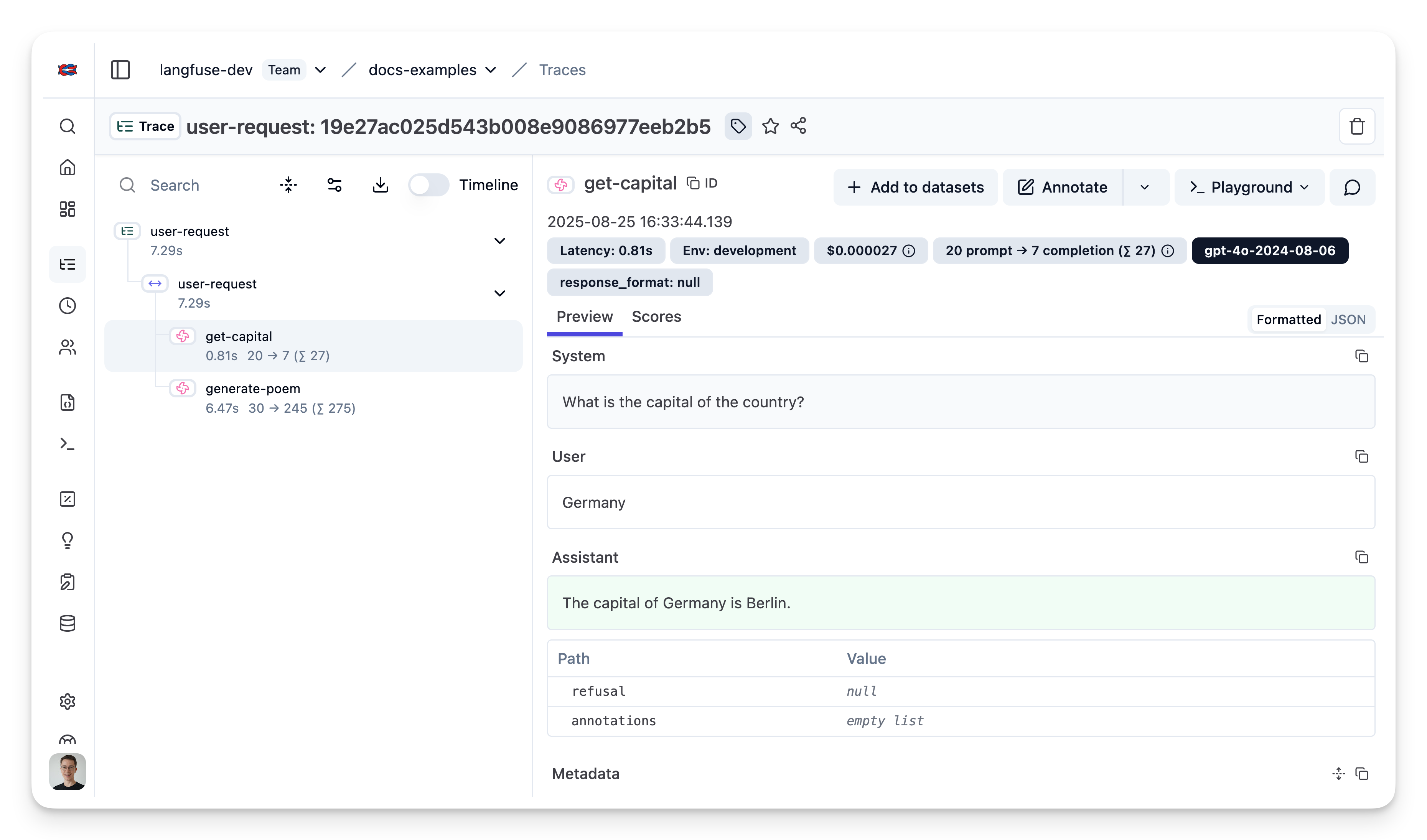
Use the context manager of the Neural Inverse TypeScript SDK to group two OpenAI generations together and update the top level span.
import { startObservation, startActiveObservation, propagateAttributes } from "npm:@langfuse/tracing";
import OpenAI from "npm:openai";
import { observeOpenAI } from "npm:@langfuse/openai";

const country = "Germany";

await startActiveObservation("user-request", async (span) => {

  const capital = (
    await observeOpenAI(new OpenAI(), {
      parent: span,
      generationName: "get-capital",
    }).chat.completions.create({
      model: "gpt-4o",
      messages: [
        { role: "system", content: "What is the capital of the country?" },
        { role: "user", content: country },
      ],
    })
  ).choices[0].message.content;

  const poem = (
    await observeOpenAI(new OpenAI(), {
      parent: span,
      generationName: "generate-poem",
    }).chat.completions.create({
      model: "gpt-4o",
      messages: [
        {
          role: "system",
          content: "You are a poet. Create a poem about this city.",
        },
        { role: "user", content: capital },
      ],
    })
  ).choices[0].message.content;

  // Propagate trace attributes
  await propagateAttributes({
    traceName: "City poem generator",
    tags: ["updated"],
    metadata: {"env": "development"},
    release: "v0.0.2",
  }, async () => {});

  // Set input and output on the root observation
  span.update({
    input: country,
    output: poem,
  });

});
Last edited