Changelog
Version 1.6.0
March 31, 2026 · General Availability
This is the first official release of NeuralInverse. After an extended private beta with
enterprise teams, the full platform is now generally available — IDE, Enterprise Console, and backend services
included.
Central control plane for your organization. Available as cloud-hosted or self-hosted
on your own infrastructure. All AI access, compliance enforcement, and team governance flows through it.
Organization
- Team Members — invite, manage, and remove developers with role-based access controls.
- Roles & Feature Policies — RBAC roles with per-user AI capability grants scoped to
exactly what each role can access in the IDE.
- Security — SSO, MFA enforcement, and session policy configuration per organization.
- Usage — token consumption and request volume reporting across all developers and
projects.
- Billing & Plans — enterprise plan management with seat controls.
Projects
- Projects carry their own IAM policy scope, compliance frameworks, and AI configuration — independent from
org defaults.
- Project-level policy overrides stack on top of org-level policy. Tighter or more permissive controls per
codebase.
Operate
- Violations — live GRC violation feed per project with severity, rule, file, and line
reference.
- Cross-file Impact — files with violations and the downstream files they affect, derived
from the import dependency graph.
- Extensions — installed IDE extensions per developer with policy enforcement status
(enabled / blocked / flagged / missing).
- Dependencies — project dependencies by ecosystem with blocked and flagged status.
- External Tools — integration status for ESLint, Pylint, SonarQube, and other external
scanners.
- Ignore & Context — files excluded from GRC scanning, and files kept as AI context
only.
Observe & Audit
- Observe — real-time compliance state across all org projects, filterable by framework,
project, and severity.
- Audit — historical violation log with framework, project, and developer attribution.
Exportable for compliance reporting.
On-Premises Deployment
- Full self-hosted option — Console, Agent Socket, and Checks Socket deployed within your infrastructure. No
data leaves your network.
- Identical feature parity with the cloud-hosted option.
- Secrets and environment variables managed at the deployment level, not stored in any
NeuralInverse-controlled system.
Fine-grained access control over every AI feature in the IDE. Policies are enforced
at the Agent Socket — there is no client-side bypass.
Policies
- Managed policies — pre-built policies for common access patterns: full access, model
access, read-only, and more.
- Custom policies — JSON-based allow/deny rules scoped to specific actions, models, or
features.
- Scope levels — policies attach at org, project, or user level. Narrower scopes override
broader ones.
- Scope override — grant elevated or restricted access at any scope without modifying the
base policy.
Enforcement
- Every AI request — chat, autocomplete, Power Mode, FIM, agent tool calls — is checked against the
developer's effective policy at the Agent Socket before reaching the model.
- Policy changes propagate to all connected IDEs within 30 seconds.
- Token quota enforcement is real-time. Exhaustion surfaces inline in the IDE immediately.
- The IDE shows an Enterprise Managed indicator on all features controlled by org policy.
Control which AI models and providers reach your developers. Two modes — org supplies
API keys, or developers bring their own.
Policy Modes
Enforced
Org admin controls all provider and model settings. API keys are
org-supplied, injected at the Agent Socket. Developers never see them.
BYOLLM
Developers bring their own API keys for org-approved providers. Admins still
control which providers and models are accessible.
Provider & Model Controls
- Enable or disable providers per org — disabled providers are hidden from the IDE entirely.
- Supported providers: NeuralInverse, Anthropic, OpenAI, Azure OpenAI, and others.
- Whitelist specific models per provider — unlisted models are blocked at the service layer.
- Assign models per IDE feature independently: Chat, Autocomplete, FIM, Power Mode, Checks Agent.
Feature Controls
- Autocomplete — AI code completion while typing. Force on, force off, or developer
decides.
- Inline Suggestions — AI suggestions on selected code.
- Auto-Accept LLM Changes — automatically accept file changes proposed by the AI.
- Fix Lint Errors — include lint errors as context when the AI runs tools.
- Auto-Approve by type — set org-level auto-approve policy per action type: terminal, file
edits, browser.
- Behavior — org-level system prompt injection prepended to every AI request.
Native AI chat in the IDE sidebar. Multi-turn conversations with full workspace
context and tool-calling support.
- Multi-turn conversation history with thread persistence across sessions.
- Workspace-aware context — reference files, symbols, and selections directly.
- Tool-calling support — the AI can read files, run searches, and inspect the workspace mid-conversation.
- Streaming responses with real-time diff previews. Apply changes inline without leaving the editor.
- Model selection per conversation within org policy.
- GRC violation context injected automatically when Checks is active — the AI is aware of the current
compliance state.
- Enterprise Managed indicator when model or features are locked by IAM policy.
A terminal-style AI interface for command-driven workflows. Full agent loop with
native tool-call rendering.
- Minimal TUI interface with a > prompt and streaming output.
- Native tool-call rendering — each tool invocation displays inline with name and arguments as the agent runs.
- Full agent loop — the model calls tools, reads results, and continues reasoning in a single session.
- MCP tool integration — all configured MCP servers are available from Power Mode.
- Checks tool bridge — GRC tools accessible directly alongside standard agent tools.
- Firmware tool bridge — when a Firmware session is active, all 22 fw_* hardware tools are available in Power
Mode.
- Dedicated model slot configurable in Console. Session history persists within the IDE window.
Autonomous coding agent that runs inside the IDE without interrupting the developer's
workflow. Behavior is configurable per project via a config file at the workspace root.
- Non-invasive — hooks into the IDE's stream state without modifying the core editor loop.
- Working memory — the agent maintains context across multi-step tasks within a session.
- Auto-approval tiers — configured per action type (terminal, file edits, browser). Org IAM
policy sets the ceiling; the project config tunes behavior per codebase.
- .neuralinverseagent — JSON config file at workspace root. Override tiers, block specific
commands, set iteration limits, and configure sub-agent behavior per project.
- GRC-aware — the agent has programmatic access to the Checks service and surfaces blocking violations before
completing a task.
Concurrent specialized agents spawned by the main Agent, each scoped to a specific
role with an isolated tool whitelist.
Roles
Explorer
Read-only. Scans the codebase, searches symbols, and builds context. Cannot
write files or run commands.
Editor
Scoped file edits. Writes only within assigned files. Tool whitelist enforced
per instance.
Verifier
Runs tests, lint, and build checks. Read and execute only — cannot modify
source files.
Concurrency
- Multiple sub-agents run concurrently up to a configurable max. Excess sub-agents queue and launch as
capacity frees up.
- Each sub-agent gets its own isolated chat thread. Permissions are bounded by the parent developer's
effective IAM policy.
Real-time GRC enforcement in the IDE. Checks evaluates every file against your
organization's compliance frameworks as you write, without blocking development.
GRC Engine
- Routes each file to the appropriate analyzers based on language, domain, and active framework rules.
- Contract Reason Service — two-phase AI reasoning. Phase 1 comprehends framework rules.
Phase 2 evaluates files against those contracts.
- Nano Agents — static analysis using LSP, AST, call hierarchy, and complexity metrics.
Runs fully offline.
- Built-in rate limiting with concurrency control, batch cooldowns, and exponential backoff.
- Content-hash caching — results persist across IDE restarts. Unchanged files are never re-analyzed.
Framework Registry
- Load compliance frameworks from JSON. Custom frameworks supported.
- Enable and disable frameworks per project from the Console. Rule-level enable/disable with description per
rule.
Ignore System
- Fully ignore — file excluded from scanning entirely.
- Context-only — file excluded from violation scanning but retained as AI context. The
model reasons about it without checking it for compliance.
- AI-powered ignore suggestions — analyzes project structure and recommends what should be ignored.
Cross-file Impact
- For every file with a violation, Checks builds a recursive impact tree from the project's import
dependency graph.
- Shows how many downstream files are affected. Visible in both the IDE panel and Console → Operate.
Checks Agent
- Dedicated AI agent for GRC accessible from the IDE sidebar.
- 10 built-in tools: get violations, domain summary, rule details, blocking violations, impact chain,
explain violation, framework rules, external tool status, workspace scan, and draft rule.
- Programmatic API — the main Agent can query violations, blocking violations, and domain summaries without
opening the UI.
- Ask about any violation directly from the violation dashboard — routes into the Checks Agent with full
context.
End-to-end codebase migration. Covers discovery, dependency resolution, AI-assisted
translation, and compliance-gated cutover. Opens as a dedicated window in the IDE.
Sessions
- Open with Cmd+Alt+M. Each migration is a named session with source projects,
target projects, stage, and plan approval state.
- Multi-source, multi-target topology — one-to-one, many-to-one, or many-to-many project relationships per
pattern.
- 30+ built-in migration pattern presets (COBOL→Java, Angular 1→18, PL/SQL→TypeScript, RPG→Java, and more).
Custom patterns supported.
- Sessions persist across IDE restarts and are visible in the Console → Modernisation dashboard.
Discovery
- Scans source and target projects concurrently with 8 parallel workers per project.
- Language detection across 40+ file extensions including COBOL, JCL, RPG, PL/SQL, and all major modern
languages.
- Unit decomposition per language — COBOL paragraphs, Java/Kotlin classes, Python functions, and more.
- Dependency graph extraction across 16 languages. Build system, framework, CI/CD, and Docker detection.
Source Resolution
- Language-specific dependency inlining before translation — COBOL COPYBOOK, PL/SQL %TYPE/%ROWTYPE, RPG
/COPY, Natural INCLUDE, Java @EJB/@Autowired, and generic imports for TS/JS/Python/Go/Rust/C#.
- Leaf-nodes-first scheduling with risk-priority tiebreaking. Cycle detection with explicit cycle reference
reporting.
Planning — Stage 2
- AI-generated migration roadmap across 7 phases: Foundation → Schema → Core Logic → API Layer → Integration
→ Compliance → Cutover.
- CPM critical path scheduling with 12 blocker types, API compatibility gates, and compliance ordering.
- Plan approval gate — Stage 3 is locked until the plan is explicitly approved. Migration
cannot begin without sign-off.
Translation — Stage 3
- 11 language pair profiles with idiomatic mapping tables. COBOL→Java includes 32 explicit idiom mappings.
- Translation verification — checks for non-empty output, no placeholders, no truncation, source language
keyword leakage, and balanced braces.
- Decisions raised during translation (blocking and non-blocking) are tracked and surfaced for review in the
Console.
Fingerprinting
- Semantic fingerprinting across 13 language profiles — extracts business rules, invariants, and logic
signatures from source units.
- Fingerprint comparison for migration validation — match percentage and divergence type between source and
translated output.
Cutover — Stage 4
- Readiness gate — 4 blocking checks and 2 warning checks must pass before cutover is approved.
- Commit writer — writes all translated files to the target project on approval.
- Audit bundle export with bundle hash and chain integrity verification — produces a compliance-ready record
of the entire migration.
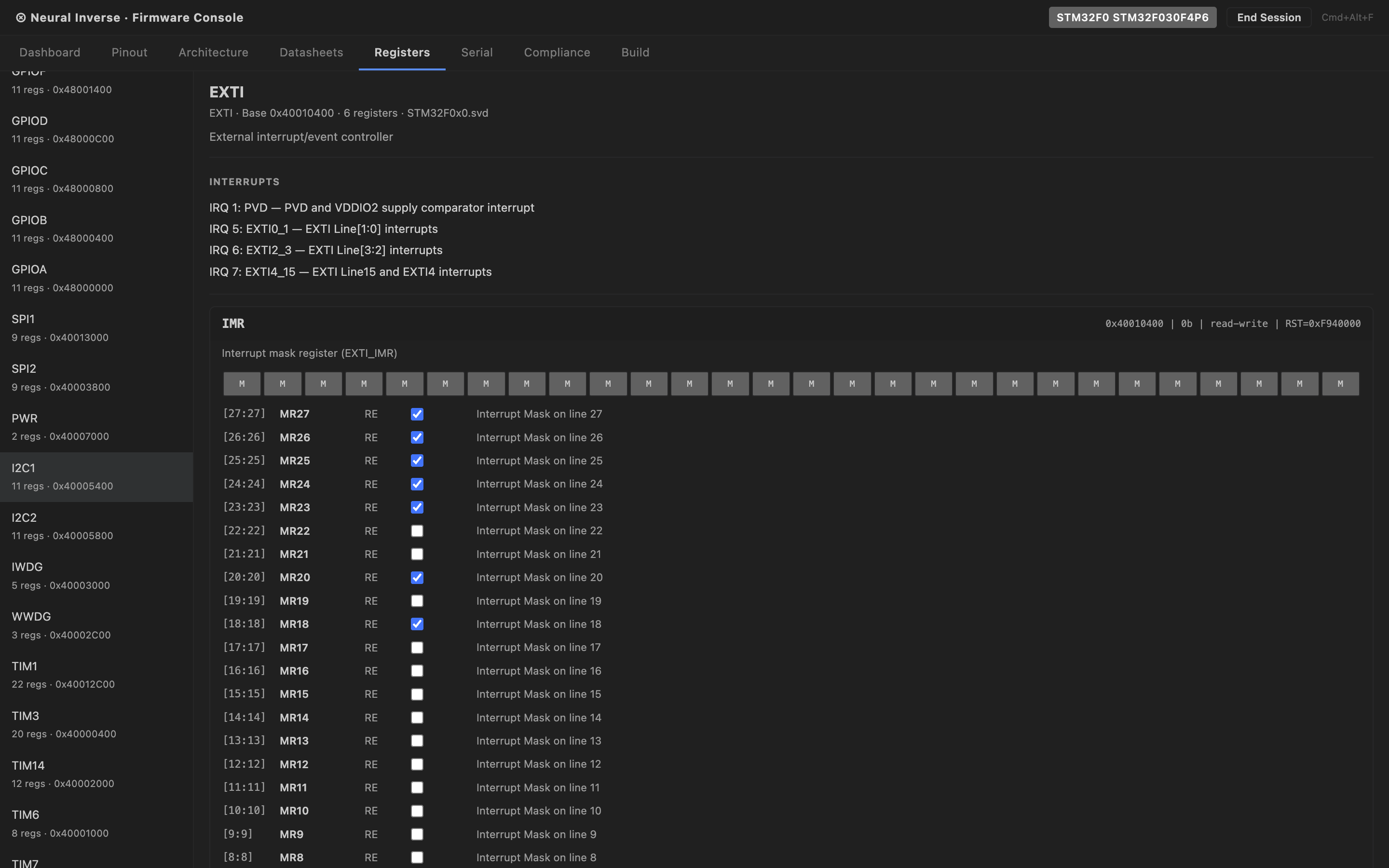
An AI-native embedded development environment built into the IDE. Hardware
specifications, register maps, timing constraints, silicon errata, and compliance rules are loaded directly into
the AI — so every chat, Power Mode session, and agent tool call is hardware-aware. Open with Cmd+Alt+F.
Session & Project Detection
- Firmware sessions persist across IDE restarts via workspace storage and a shareable
Firmware.inverse manifest file at the workspace root.
- Auto-detects firmware projects with confidence scoring — reads platformio.ini, STM32CubeMX .ioc, sdkconfig
(ESP-IDF), prj.conf (Zephyr), Cargo.toml (Rust embedded), CMakeLists.txt, Makefile, and .ino files. A
Firmware.inverse file always scores confidence 1.0.
- Extracted automatically: MCU variant, board name, RTOS, build system, HAL/framework, compliance
frameworks, SVD paths, and datasheet paths.
- When a session is active, hardware context is injected into Chat and Power Mode system prompts
automatically — the AI sees the active MCU, loaded peripherals, datasheet summaries, compliance frameworks,
and available tools.
MCU Database
- 357 MCU variants across 11 manufacturers — STM32 (all families), nRF (Nordic), ESP32,
RP2040/RP2350, NXP, Renesas, TI, Infineon, Silicon Labs, GigaDevice, and others.
- Cores covered: Cortex-M0/M3/M4/M7/M23/M33/M55, RISC-V, TriCore, AVR, Xtensa, RX.
- Fuzzy search by part number, family, board name, or keyword. Platform ID resolved automatically for skill
injection (stm32, esp32, nrf, rp2040).
SVD Register Maps
- Full CMSIS-SVD XML parser — handles derivedFrom peripheral inheritance, dimension array expansion, and
default value cascade from device down to register level.
- Bundled minimal SVDs for instant load without any network fetch: STM32F4/F7/H7/L4/G4, nRF52840, ESP32,
RP2040.
- SVD auto-fetcher pulls from the posborne/cmsis-svd repository for 60+ STM32 patterns and Nordic/RP2040
parts. Cached in memory — no repeated downloads per session.
- Interactive peripheral register tree in the Firmware window. Hover over any register in the editor to see
SVD description, reset value, access type, and bit field breakdown inline.
Datasheet Intelligence
- Upload any MCU PDF datasheet or reference manual. Extraction runs through a 3-tier pipeline — results are
content-hash cached and stored in .inverse/hardware-kb/ at the workspace root, shareable
with the team.
- Tier 1 — custom PDF parser with FlateDecode decompression. No external dependency, runs
in-browser.
- Tier 2 — heuristic page classification (zero LLM calls): registers, timing tables,
errata, pinout, memory map, electrical characteristics, and more.
- Tier 3 — LLM reclassification for ambiguous pages, capped at 150 pages per document. SVD
override: if a part number is identified in the PDF, the authoritative SVD is fetched from GitHub instead of
using heuristic extraction.
- Re-opening the same PDF costs zero LLM calls. A 400-page reference manual processes in approximately 10
seconds on first open.
- Mismatch detection — a warning badge is shown if a datasheet's identified part number does not match the
active MCU session.
Build, Flash & Size Analysis
- 9 project types supported: PlatformIO, CMake, Make, ESP-IDF, Cargo (Rust), Arduino CLI, Zephyr,
STM32CubeIDE, Mbed.
- 11 flash tools: openocd, stm32-programmer-cli, st-flash, esptool, nrfjprog, jlink, pyocd, probe-rs,
dfu-util, arduino-cli, west.
- GCC diagnostic parser — build errors map directly to file, line, column, and severity.
- Binary size analysis — text / data / bss section breakdown with Flash and RAM usage displayed as
percentage gauges.
Serial Monitor
- Web Serial API integration with platform port enumeration.
- 10,000-line RX/TX ring buffer with timestamps. Log export as text or CSV.
- Debug probe auto-detection: ST-Link, J-Link, CMSIS-DAP, FTDI, CP210x, CH340, and others.
- Baud rate auto-detection heuristic. DTR/RTS signal control for bootloader auto-reset (ESP32).
Hardware-in-the-Loop Debug
- 5 GDB server integrations: OpenOCD, J-Link GDB Server, pyocd, st-util, QEMU.
- CPU register read (r0–r15, sp, lr, pc, xpsr), memory read/write at arbitrary addresses.
- Breakpoint set and remove by file:line or function name. Step, step-instruction, continue, halt, reset.
IDE Diagnostics
- Register completions with addresses and bit field documentation in the editor autocomplete.
- 10 firmware-specific analysis rules surfaced as IDE diagnostics: missing volatile on register accesses,
non-atomic read-modify-write, dynamic memory allocation in firmware, floating-point in ISR, variable-length
arrays, missing interrupt flag clear, and others.
Agent Tools
- 22 fw_* tools available in Power Mode and to the main Agent when a Firmware session is
active.
- MCU & session: get MCU info, list peripherals, search MCU database, scan project, session info,
workspace scan.
- Registers: get register map, peripheral config, bit field info, clock config.
- Datasheets: upload datasheet, query datasheet, get citations, get errata, check silicon bug, get timing
constraints.
- Build & flash: build project, flash device, binary analysis.
- Serial: read and write to serial port.
- Debug: start debug session, send GDB command, read CPU registers, read/write memory, set breakpoint.
Platform Knowledge Packs
- STM32 — RCC clock enable patterns, GPIO alternate function tables, HAL vs LL guidance,
FLASH wait state rules, DMA stream/channel patterns.
- ESP32 — ESP-IDF task model, FreeRTOS core affinity, ADC2/WiFi conflict, IRAM_ATTR
placement, menuconfig navigation.
- nRF (Nordic) — Zephyr west build, EasyDMA RAM buffer requirements, HFXO for BLE,
devicetree pin assignment.
- RP2040 / RP2350 — dual-core patterns, PIO state machine authoring, QSPI XIP constraints,
USB 48MHz clock requirement.
Compliance
- Supported frameworks: MISRA C:2012/2023, CERT C, IEC 62304 (medical), ISO 26262 (automotive), DO-178C
(airborne), IEC 61508 (industrial), AUTOSAR.
- Active frameworks and errata warnings visible in the Firmware window Compliance tab and the IDE status
bar.
- Status bar format: ⚡ STM32F4 · MISRA ✓ · 3 datasheets — visible only when a session is
active.
Isolated workspace management for sensitive and air-gapped development contexts.
- Opens as a dedicated auxiliary window. State persists across IDE restarts per workspace.
- Designed for projects requiring network isolation or strict data-boundary enforcement.
- Each project maintains its own enclave configuration independently.
AI-powered inline completion that understands the code before and after the cursor,
not just the line being typed.
- Triggers automatically as you type. Completions appear as ghost text inline.
- Model assignable independently from Chat and Power Mode in Console → AI → FIM.
- Org can force-enable, force-disable, or leave to developer preference.
- Token budget and debounce configurable per org.
Model Context Protocol server management. Admins configure org-wide servers from the
Console. Developers can add their own unless locked by policy.
- Add and manage MCP servers in Console → AI → MCP. Available to all developers in the org.
- Lock enforcement — locked servers cannot be removed or disabled by developers in the IDE.
- MCP tools are callable from Chat, Power Mode, and the main Agent.
- Server configuration propagates to all connected IDEs within 30 seconds.
IDE distribution management for your organization. Packages for all major platforms
available from Console → Distribution.
macOS
- Apple Silicon (arm64) — .pkg (MDM compatible), .dmg, .zip
- Intel (x64) — .pkg (MDM compatible), .dmg, .zip
Windows
- x64 — .exe (Inno Setup), .msi (Group Policy / SCCM), .zip (Portable)
- ARM64 — .exe, .msi, .zip
Linux
- x64 — .deb, .rpm, .AppImage, .tar.gz
- ARM64 — .deb, .tar.gz
- ARMhf — .deb, .tar.gz